Integration API and webhooks
Let other software read your Rotaleave data with API keys and receive events by webhook: switching it on, scopes, signing, retries and delivery logs.
Updated 13 October 2026
The integration API lets other software read your organisation’s people, clock punches and leave, and lets Rotaleave push events to your own web address as they happen. This page is an orientation for an admin or their developer, not a full reference. Only admins can create and manage keys and webhooks.
Switch it on
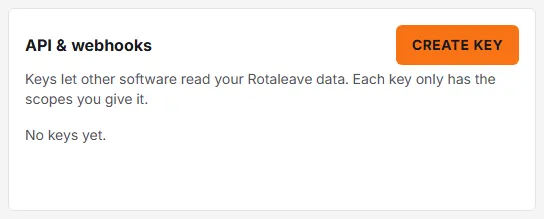
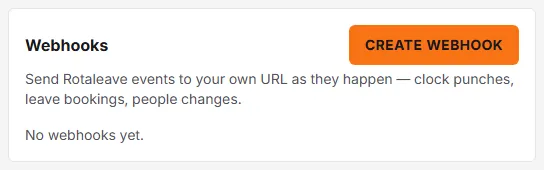
The feature is off by default. An admin turns on the Integration API switch (“API keys and webhooks for other software”) under Settings → Organisation → Features. Until then the API & webhooks and Webhooks cards on the Integrations page cannot create anything. They still list what exists, and you can still revoke keys, pause, edit or delete webhooks, so a leaked key can be shut off without switching the API back on. The Integrations page is at Settings → Data → Integrations.
API keys
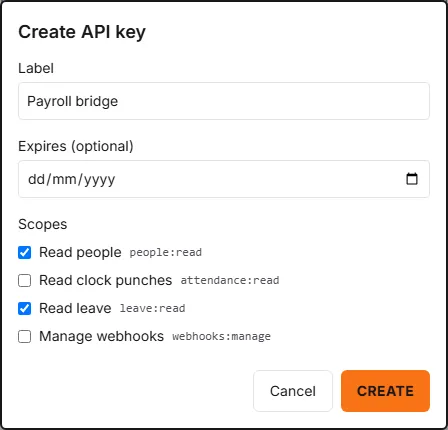
On the API & webhooks card, click Create key and give it:
- a Label (up to 100 characters) so you remember what uses it;
- an optional Expires date, which runs to the end of that day (UTC);
- one or more Scopes, at least one required: Read people (
people:read), Read clock punches (attendance:read), Read leave (leave:read) and Manage webhooks (webhooks:manage).
The full key is shown once, in a panel headed “copy it now. It can’t be shown again.” Rotaleave keeps only a hash, so a lost key cannot be recovered; revoke it and make another. The table afterwards shows each key’s first characters, scopes, expiry, last use and status (Live, Revoked or Expired). An organisation can have up to 10 live keys.
Revoke stops a key working immediately and cannot be undone.
What the API does
Software sends the key as Authorization: Bearer <key> to addresses under /api/v1. A key is limited to 300 requests a minute. The API serves its own machine-readable description at /api/v1/openapi.json; there is no separate public documentation page.
whoami: which organisation and scopes the key has.people: needspeople:read.attendance/punches: needsattendance:read. Very recent punches (under about 30 seconds old) are held back so that a feed read in pages does not miss any.leave/typesandleave/bookings: needleave:read.webhooks(list, create, edit, delete, rotate secret, test, deliveries, resend): needwebhooks:manage. To subscribe an endpoint to events, the key also needs the read scope for each kind of event:attendance:readfor punches,leave:readfor bookings,people:readfor people, and all three for all events.
The lists are paged with a cursor, 100 rows by default and 500 at most. The API reads people, punches and leave; the only thing it can change is your webhook endpoints.
Webhooks
On the Webhooks card, click Create webhook and enter:
- the URL, which must be
httpsand must not point at a private or local address; - an optional Description;
- the Events to send, or All events.
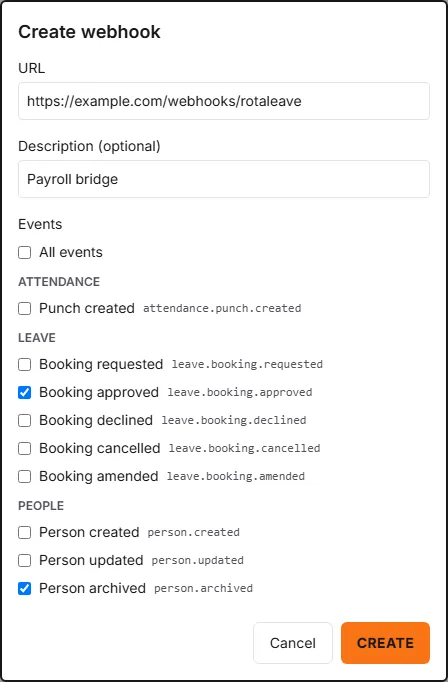
An organisation can have up to 10 endpoints. The events are: Punch created (attendance.punch.created); Booking requested, approved, declined, cancelled and amended (leave.booking.*); and Person created, updated and archived (person.*). There is also test.ping, sent by the Test button. Events are not a complete change feed: some changes, such as re-imports that update existing people, emit nothing, so use the API to reconcile. Each event arrives as JSON with an id, a type, a timestamp and a data object.
The signing secret (whsec_…) is shown once when you create the endpoint, and again each time you click Rotate secret. After a rotation the old secret keeps working for 24 hours.
Verifying a delivery
Each request carries webhook-id, webhook-timestamp and webhook-signature headers, in the Standard Webhooks style. The signature is v1, followed by a base64 HMAC-SHA256 of {webhook-id}.{webhook-timestamp}.{raw body}. The key for the HMAC is not the secret as text: take the part after whsec_ and base64-decode it. For 24 hours after a rotation the header holds two signatures separated by a space, one for each secret; accept the request if either matches. Check the signature against the raw body before parsing, and use webhook-id to ignore duplicates, because a retry or a resend carries the same ID.
Retries and failures
Any 2xx reply within 10 seconds counts as success, and redirects are not followed. Otherwise Rotaleave retries after about 5 seconds, 30 seconds, 5 minutes, 30 minutes, 2 hours, 6 hours and 24 hours (with some random variation). After the eighth failed attempt the delivery is marked failed. Deliveries to one endpoint are sent in order, so one that is retrying holds later ones back.
If an endpoint has been failing for more than 24 hours it is switched off. A red notice appears on the card (“switched off after 24 hours of failed deliveries”) and every active admin is emailed. Events keep queuing while it is off, and Resume sends them in order, though queued events older than 30 days are discarded. A Paused endpoint also queues events.
Seeing deliveries
Click Deliveries on an endpoint to see its recent log: time, event, status, response code, attempts and next attempt. Hover a failed row for the error. Resend re-queues a sent or failed delivery with the same webhook ID. Deliveries are kept for 30 days.