Approval rules
How Rotaleave decides who approves leave: the default ladder from team to department to admins, and multi-level approval policies.
Updated 13 October 2026
Rotaleave routes every leave request to the right people in one of two ways: by where the person sits, or by a policy you build.
The default: managers approve
With no policy configured, a request goes to the nearest of these that has anyone in it:
- their team’s managers,
- their department’s managers, then the managers of each department above it,
- the organisation’s admins. In an organisation with no teams, no department managers and no policies at all, every manager can approve too.
For most teams this is all you need — it’s the “Managers approve (recommended)” option in the setup wizard. A department with nobody in charge isn’t a dead end: the request climbs to the next tier up. When that is a department above it, the card on the Approvals page says “Climbed from” the requester’s department; when it goes straight to the top tier (the admins, or an organisation policy) there is no badge. Admins can open any pending request whichever tier it sits at, unless a privacy block hides that person’s leave from them.
Managers’ own requests
A manager’s own request is never routed to themselves: it skips the tier they approve for and goes to the one above. Two settings change that:
- Settings → People & structure → Approvals: “Managers at the same level can approve each other’s requests.” Off (the default), a manager’s request goes to the tier above them. On, another manager of the same team or department can approve it.
- Managers of this department can approve their own leave requests, on the department’s settings page, for a remote or standalone department with nobody above it.
Admins are the exception to all of this: an admin’s own pending request shows on their own Approvals page, and they can approve it themselves.
Approval policies
When you need explicit control — named approvers, multiple sign-offs, different rules per department — build a policy. A policy replaces the managers at the tier it is saved on, and there are three tiers:
- Team — the “Approval policy” section on the team’s page (Settings → People & structure → Teams). It applies to people who have this team in the Team column on People. Someone who has only been added as a member on the team’s page isn’t under this policy: unless the team in their own Team column has a policy, any one manager of the teams they belong to can approve.
- Department — the same section on each department’s settings page. It also covers people in departments beneath it that have no approvers of their own.
- Organisation — Settings → People & structure → Approval policies (admin-only). This is the top tier: it takes the place of “admins approve”.
A request waits with the nearest tier that has approvers. Otherwise it is escalated one step (to the next level, or the next tier) only if everyone at its current level is on approved leave with no delegate, and only when approver cover is switched on.
How a policy is built
A policy is a sequence of levels, approved in order:
- Each Level card holds one or more approvers picked from your managers and admins.
- Within a level, approvers are alternatives (“or”) — and when a level has several, a “Needed: N of M” dropdown sets how many of them must approve (a quorum).
- + Add level (then) chains another level that only starts once the previous one passes.
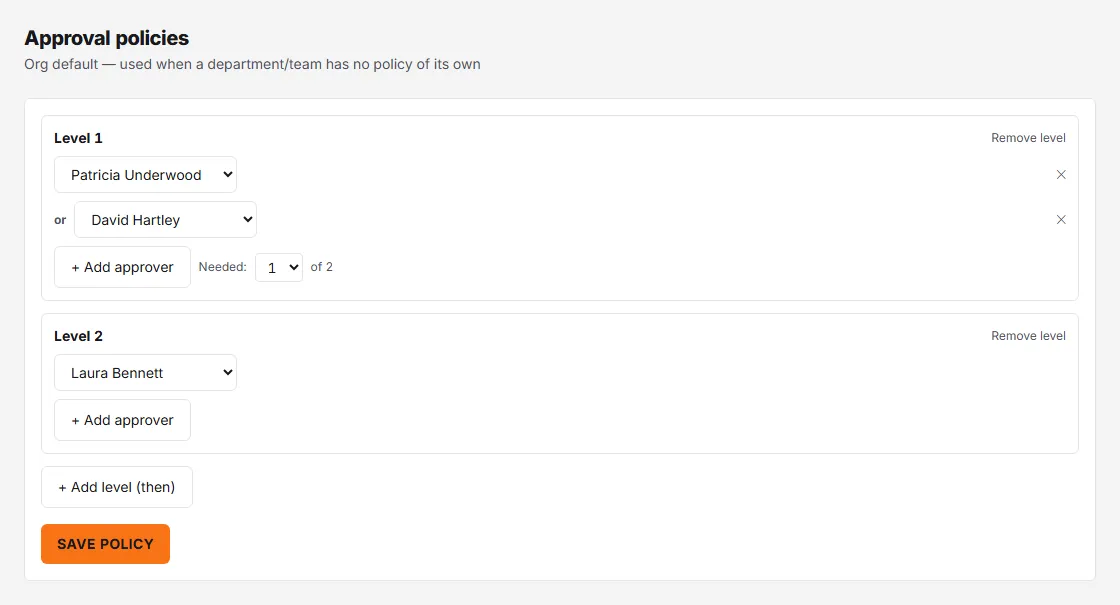
So “either shift supervisor, then the ops director” is two levels; “any 2 of 3 partners” is one level with Needed: 2 of 3. An admin who approves a request approves it outright, whatever level it has reached.
Click Save policy when done, or Remove policy to fall back to the default. Naming someone in a team or department policy also makes them a manager of that team or department, and for a team adds them to it if they weren’t a member. Removing the policy later does not undo that: they stay a manager there, and so an approver under the default, until you take them off. Approvers see “Level 2 of 3” style badges on the Approvals page when the request’s nearest tier is a policy.
Admins can see which rule governs each team and department on People → Organisation Chart Tree, and click a rule badge there to edit its policy.