Approve or decline requests
Work through pending leave in Rotaleave's Approvals page — coverage warnings, override reasons, declining kindly and amending requests.
Updated 13 October 2026
Managers and admins see Approvals in the Manage menu. The page header counts everything pending — leave requests, plus TOIL requests and shift claims and swaps where your organisation has those switched on. A manager sees the leave requests that route to them (or to someone they cover for) and TOIL requests from people they are an approver for; shift claims and swaps are shown to every manager. An admin can act on a pending leave request at any tier, unless a privacy block hides that person’s leave from them.
Anatomy of a request card
Each card shows who’s asking, the leave type and dates (or times, for hourly requests), and any warnings you should weigh up before deciding:
- ”✗ Approving leaves a gap” — the request would breach a coverage rule set to block (for example too few first-aiders that day). A rule set to warn doesn’t appear here. A rule can apply to one department, if your organisation uses department cover rules.
- ”⚠ Department over capacity” — it would push the requester’s department past its max people off at once limit (Settings → People & structure → Departments; 0 means no limit).
- “ℹ 2 more pending for Thu 17 Sep” — a plain grey line, not a warning: other people in the requester’s department have asked for the same day and nobody has decided yet.
- “Also rota’d” — the person already has shifts on those dates (rota users only).
- “Level 2 of 3 · 1/2 approved” — where the request sits in a multi-level approval policy. It appears only when the request’s nearest approval tier is a policy.
- “Climbed from [department]” — the request came up to you from the requester’s own department (named on the badge) because nobody there could approve it.
- “On behalf of [name]” or “Escalated — [name] is on leave” — you’re seeing it through delegation.
Three actions per card: Amend (a link that opens the request in the edit form so you can adjust it), Decline and Approve. Saving an amendment replaces the original with a new request, which goes through the usual checks and approval again; the requester is emailed that it was amended. A request that starts today or earlier can’t be amended: decline it and book the right dates for the person instead, or approve it as it stands.
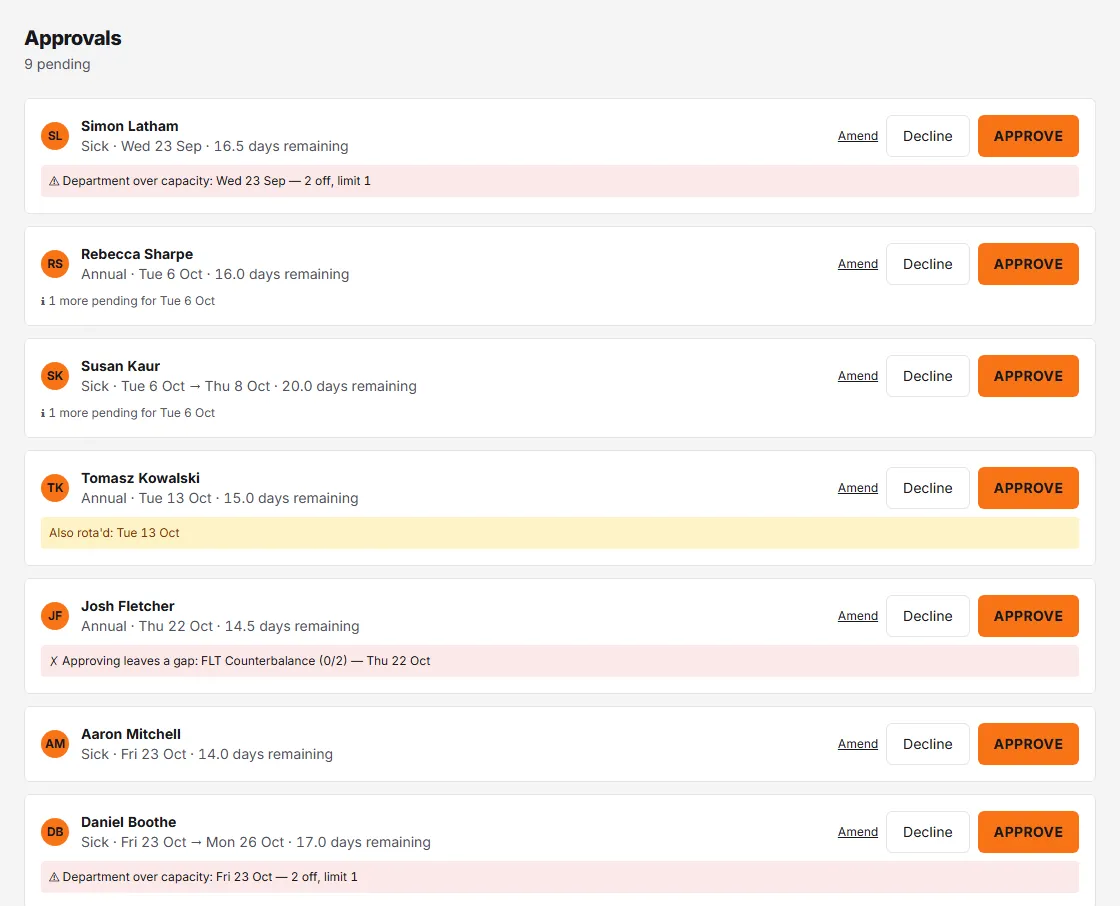
Coverage and capacity — here, on the coverage board and on the dashboard — count approved leave only; pending requests never do, which is why the grey “N more pending” line exists.
Approving
Click Approve and confirm — the dialog reminds you “They’ll be notified straight away.” If the request would breach coverage, the dialog becomes “Approve despite the coverage gap?” and you must type an override reason before Confirm override unlocks. The same applies to the capacity warning. Overrides are deliberate, recorded decisions — not a bigger OK button.
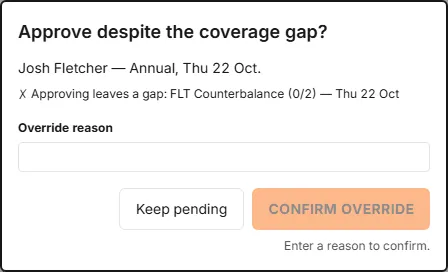
In a multi-level policy, your approval counts for your level and the request stays pending until every level has passed. An admin’s approval finishes it at once.
Declining
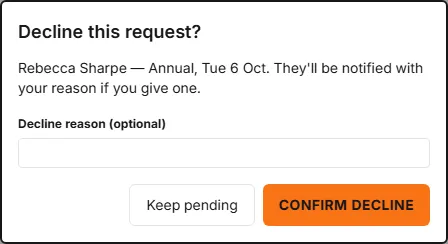
Click Decline. The reason field is optional — “They’ll be notified with your reason if you give one.” If you give a reason, it is included in the email the requester receives (“Your leave was declined”). A short, honest reason lands far better than silence.
Staying on top of it
- Requests email you as they arrive (“A leave request needs my approval”) and there’s an optional daily summary of requests awaiting my approval — both in your notification preferences. People with the mobile app also get a push notification when the email goes out.
- You’re also emailed (“A leave booking was cancelled”) when someone you approve for cancels a booking.
- Going away? Where approver cover is switched on, set a delegate so requests route to cover while you’re out.