Departments and teams
Organise people into departments and teams in Rotaleave — cover limits, parent departments, managers, clock-in settings and default working hours.
Updated 13 October 2026
Departments are the main grouping in Rotaleave — they drive cover limits, report filters and approval routing. Teams are a finer grouping inside (or independent of) a department. Both are admin-only, under Settings → People & structure (the Departments and Teams links).
Departments
Add a department by typing its name and clicking Add department. Select one to manage its settings:
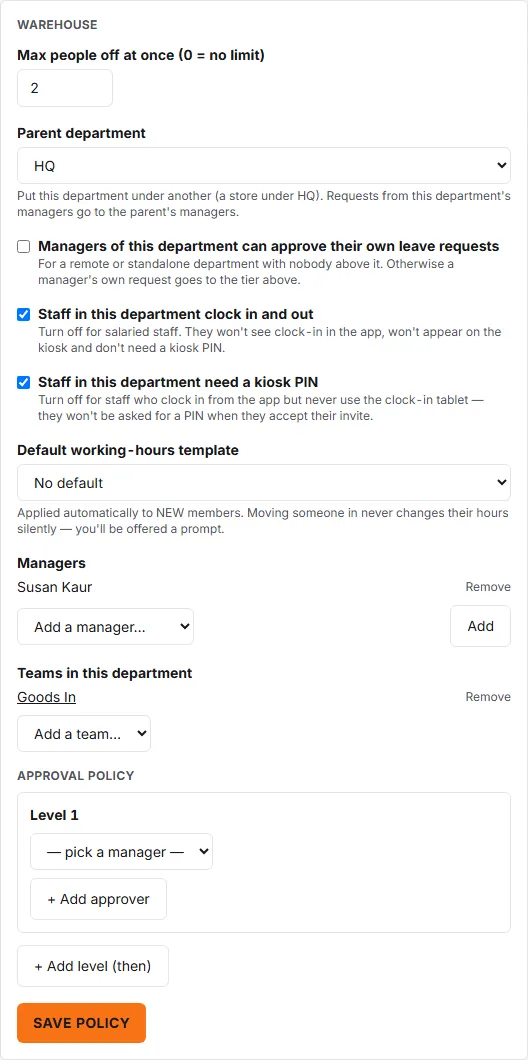
- Max people off at once — the department’s cover limit (0 = no limit, up to 20). When an approval would take the department over this cap (counting leave that is already approved), the approver sees a “Department over capacity” warning on the request and has to give a reason to override it.
- Parent department — put this department under another (a store under HQ); the default is None (top level). A request that reaches this department’s managers stays with them: one approval there is enough. It goes up to the parent’s managers only when this department has nobody who can approve it — for example a manager’s own request — or, with Approver cover switched on, when every one of its approvers is away on approved leave with nobody covering for them.
- Managers of this department can approve their own leave requests — for a remote or standalone department with nobody above it. Otherwise a manager’s own request goes to the tier above.
- Staff in this department clock in and out and Staff in this department need a kiosk PIN — the first appears only when clock-in is switched on for your organisation, and the second only while the first is ticked. Turn the first off for salaried staff: they won’t see clock-in in the app, won’t appear on the kiosk and don’t need a kiosk PIN. Turn the second off for staff who clock in from the app but never use the tablet; they won’t be asked for a PIN when they accept their invite.
- Default working-hours template — applied automatically to new members. Moving an existing person into the department never changes their hours silently: you get an “Apply department hours?” prompt with Keep current hours / Apply choices. Once a default is set, an Apply to all members button appears; it lists exactly whose hours would change before you click Confirm.
- Managers — add or remove the people who manage this department. Department managers are part of the default approval cascade. On Timesheets, a manager sees themselves and the people they manage (the same rule as leave approvals); admins see everyone.
- Teams in this department — attach teams to the department.
- Approval policy — an optional department-specific policy that overrides the org default; see Approval rules and policies.
You can’t delete a department that still has child departments, teams, members or cover rules attached — reassign those first.
Teams
Teams hold members and optional team managers:
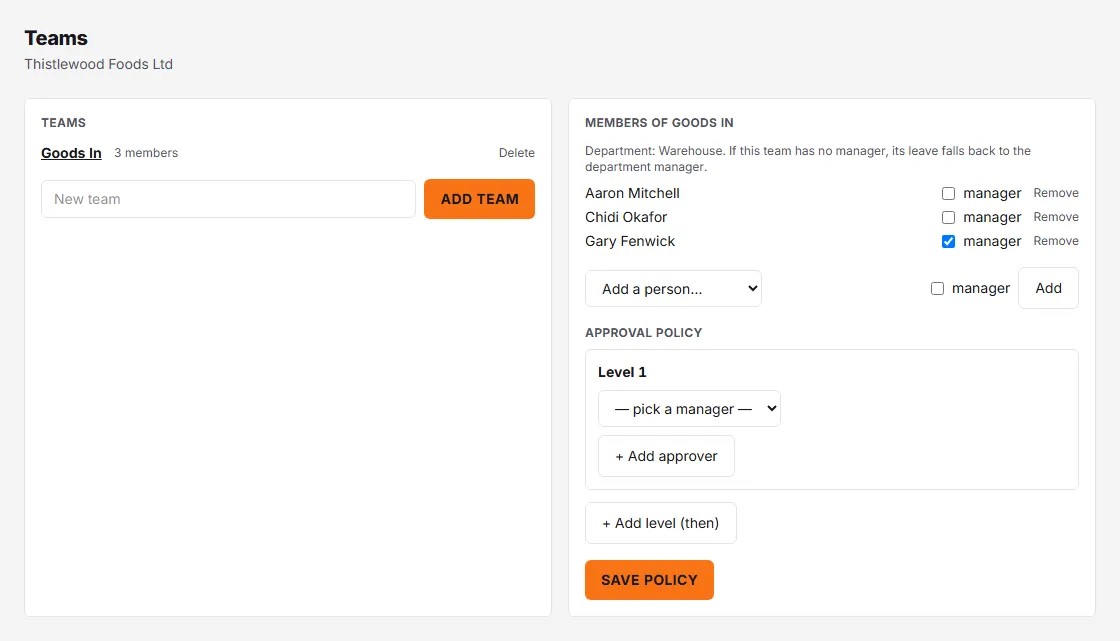
- Add a team with Add team, then select it to manage Members.
- Each member row has a manager checkbox — tick it to make them a team manager.
- If a team has no manager, its leave requests fall back to the department manager.
- Teams can carry their own Approval policy too.
A person’s Home team is set in People → ⋯ → Personal settings → Home team (admins), or left as “None (department-governed)”.
How requests route
With no approval policy anywhere, a leave request is pending with the first of these that has someone to approve it: the team managers, then the department managers, then the managers of each parent department above it, then the organisation’s admins. An admin can also approve a pending request at any point, wherever it is waiting (unless a privacy block hides that person’s leave from them). If the organisation has no teams, no department managers and no approval policies at all, its active managers can approve too. A policy at team, department or org level replaces the managers at that level — most specific wins. By default a manager’s own request skips any level where they are an approver, and climbs to the next. Two settings change that: Managers of this department can approve their own leave requests (above) keeps the request with that department’s managers, and Managers at the same level can approve each other’s requests (below) leaves it with the other approvers at that level, if there are any.
Two organisation-wide settings sit under Settings → People & structure: Managers at the same level can approve each other’s requests (off by default), and Organisation Chart Tree for managers, which decides whether managers can see the chart (Admins only, Their own area, or The whole organisation). The chart itself is at People → Organisation Chart Tree; see its reference page.