Leave types
Create and configure Rotaleave leave types — colours, approval, allowance deduction, sickness behaviour and TOIL flags.
Updated 13 October 2026
Every booking has a leave type — it sets the colour on the wall chart, whether approval is needed, and whether the time comes off the holiday allowance. Admins manage them at Settings → Leave → Manage → Leave types.
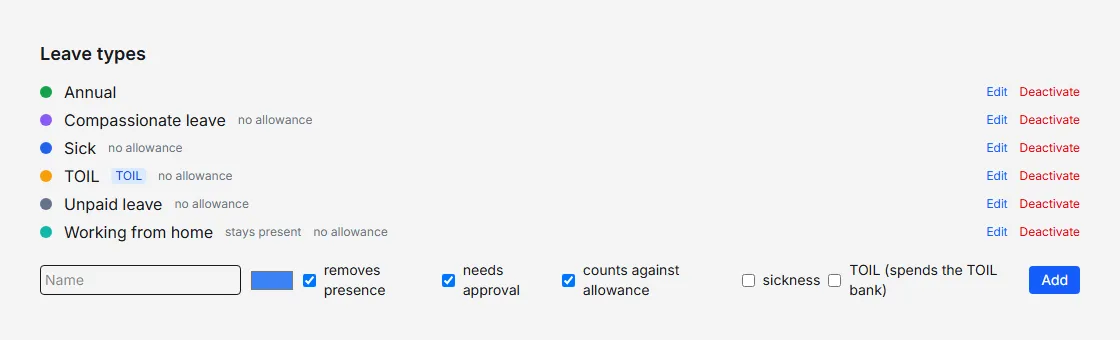
Create a type
Give it a name, pick a colour, and set the checkboxes:
- removes presence — the person shows as away on the wall chart, and the booking counts in coverage rules and department limits (untick for types like Working from home, which then show a “stays present” tag in this list). You can’t change this once anyone has booked the type.
- needs approval — untick for types you’re happy to have self-recorded: the booking is approved as soon as it is made (unless an employee’s request breaks a coverage rule or department limit, which still waits for a manager).
- counts against allowance — untick for unpaid leave, jury duty and other non-holiday absence (they show a “no allowance” tag).
- sickness — marks the type as sick leave. Sickness never counts against the holiday allowance. It is also the type a holiday booking can be reclassified to from the person’s Personal settings, and the Absence report uses sickness types as its default. (Sickness carry-over is granted separately, per person: see carry-over.)
- TOIL (spends the TOIL bank) — bookings of this type draw on banked overtime hours instead of the allowance; see TOIL. Shown when TOIL is enabled for your organisation.
Sickness and TOIL are mutually exclusive with each other and with “counts against allowance” — the form enforces it.
Change a type
Edit next to a type puts it back in the form; Save applies the change to its existing bookings from then on.
Retire a type
Deactivate hides a type from new bookings while keeping history intact. You can’t deactivate the last active type — there must always be something to book.
Pay codes (payroll organisations)
If payroll export is enabled, a Payroll codes section maps each leave type to a pay code, description and paid/unpaid flag per payroll system (Generic CSV, Xero, QuickBooks). Unmapped types are tagged and flagged in the export — see Payroll export.