TOIL — time off in lieu
Bank overtime as TOIL credits in Rotaleave and let people spend them as leave — grants, expiry, balances and booking.
Updated 13 October 2026
TOIL (time off in lieu) lets you credit people with hours for overtime worked, which they later spend as time off — without touching their holiday allowance. TOIL is an organisation feature; once enabled, it needs a leave type flagged “TOIL (spends the TOIL bank)” (see Leave types).
TOIL is always measured in hours, whatever unit someone’s holiday balance uses.
Grant TOIL (admins)
Admins open People → Personal settings for a person; its TOIL (time off in lieu) section shows the person’s balance and ledger, and takes new grants:
- Effective date — when the credit lands.
- Hours — the field steps in quarter hours.
- Expires — leave blank to use your organisation’s default expiry (Settings → Leave → TOIL; blank there means never), or set a use-by date if you’ve agreed something different (“take it within 3 months”).
- Reason — e.g. “Saturday stocktake, 7.5h”.
Click Grant TOIL. The ledger lists every credit with its status (Pending, Active, Declined, Voided), expiry and reason. Made a mistake? Void an active credit — unless that would leave TOIL someone has already taken uncovered (beyond the negative limit, if you set one), in which case the void is refused to keep the books honest.
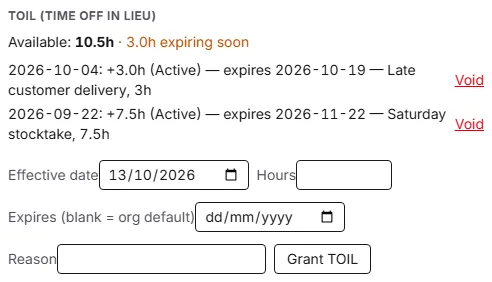
Whose TOIL you can see and change. Granting and voiding follow the approval ladder, not the People list: the server lets a manager grant or void only for people they approve for, and an admin for everyone. In the web app the Personal settings panel opens for admins; managers handle TOIL through the requests that reach them on the Approvals page (see below). Where someone doesn’t manage the person, the section is deliberately blank — “You don’t manage this person’s TOIL, so their balance isn’t shown.” — rather than showing a confident 0.0h for somebody who has banked plenty.
Spend TOIL (everyone)
Book it like any other leave: My leave → + Book time off, choose the TOIL leave type, and pick the duration. What you can pick depends on your organisation’s TOIL is taken in setting (Settings → Leave → TOIL): Hours lets you book by the hour in 15-minute steps — one date, a start time and an end time — as well as half and full days; Half days offers mornings, afternoons and full days; Full days offers whole days only. Hours is the default. The form quotes the cost live — “This request: 1.0h TOIL · 4.0h TOIL remaining after” — and blocks a request beyond your balance (admins can override with a reason). The mobile app offers the same Hours switch for TOIL when your organisation allows it, and, from the app release that follows 1.2.4, for every other leave type that can be booked in hours too.
An hourly request only deducts the minutes that fall inside your working hours for that day. If none do, the form says so and nothing is deducted — check the working pattern before assuming the booking is wrong.
Claim TOIL for hours already worked (everyone)
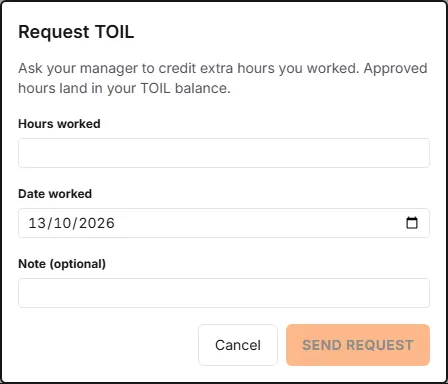
On My leave, the TOIL card has a Request TOIL button. Enter the Hours worked, the Date worked (today or earlier) and an optional note, then Send request. The request goes to the managers and admins who approve for you, who answer it on the Approvals page; approved hours land in your TOIL balance, and pending requests are listed on the card.
Going below zero
By default a TOIL balance cannot go below zero. An admin can set a Negative TOIL limit in hours (Settings → Leave → TOIL) to let staff take TOIL before they have banked it — “you can owe us up to 4 hours”. The booking form then shows the after-figure in amber when it dips below zero, and refuses anything past the limit: “This exceeds your TOIL limit — 1.0h available and you can go to -4.0h, this needs 6.0h.” Your balance card, the mobile app and your manager’s view of your allowance all show the negative figure with a note of the limit, and it appears on the TOIL report too. Hours credited later pay the debt off first — including hours that would otherwise have lapsed. Managers are bound by the limit like everyone else; admins can still override with a reason.
Keeping an eye on balances
- My leave shows a TOIL card with the available balance and an amber “expiring soon” warning when credits are approaching their use-by date.
- People can enable the “Time off in lieu is credited to me” email in their notification preferences.
- The same balance, ledger and expiry warnings appear on the person’s Personal settings panel for admins — see “Whose TOIL you can see and change” above.
Default expiry
Admins can set a default expiry for TOIL in Settings → Leave → TOIL (“TOIL expires after … days”). Any credit that is granted, or approved from a staff request, without its own date then lapses that many days after the day it was earned — the ledger shows the resulting date. Leave the setting blank and credits never expire unless a date is set on each one. The setup wizard offers 30 days when TOIL is switched on; organisations that were already using TOIL keep “never” until an admin changes it.
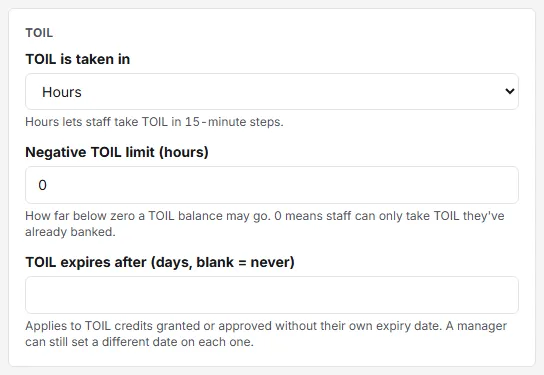
When approving a TOIL request, a manager can enter a different Expires on date on the approval dialog to honour an agreement — that date wins over the default. Existing credits are never changed by the setting.