Set annual leave allowances
Configure Rotaleave allowances: the org default, accrual mode, per-person overrides, display units and dated manual adjustments.
Updated 13 October 2026
Allowances have two layers: an organisation default that covers most people, and per-person overrides for everyone else. Both are admin-only.
The organisation default
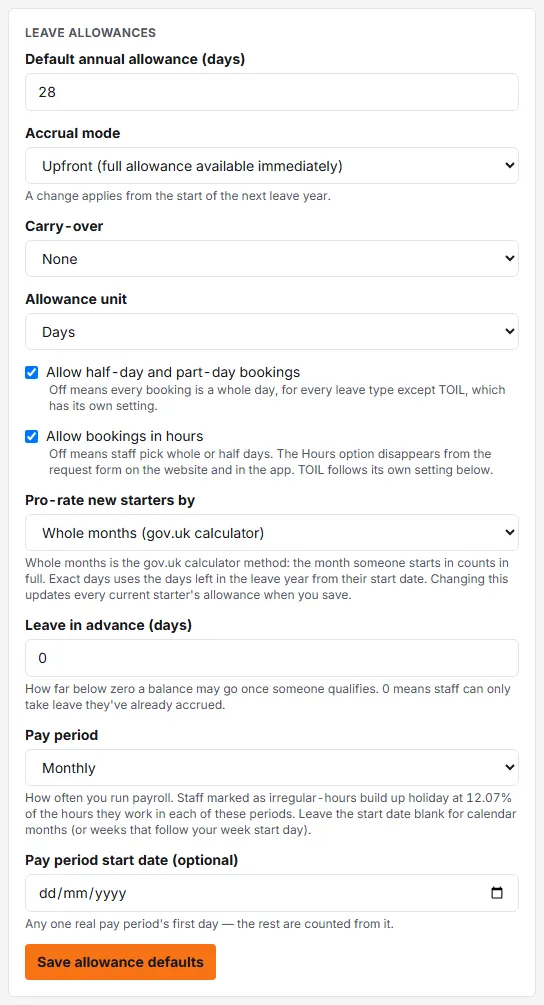
In the Leave allowances card on Settings → Leave:
- Default annual allowance — what everyone gets unless overridden. 28 days is the UK statutory floor for full-timers (which may include bank holidays — see Bank holidays and closures).
- Accrual mode — Upfront (the full allowance is bookable from day one of the leave year) or Monthly (it builds up month by month, the current month counted from its 1st). On an organisation that already has deducting bookings or adjustments, a change applies from the start of the next leave year; before that it takes effect straight away.
- Carry-over — None, Capped (with a cap) or Unlimited; detail in Carry-over between leave years.
Click Save allowance defaults. The same card also holds the half-day and hourly booking switches, the starter pro-rata method, leave in advance and the pay period; see the Settings → Leave reference.
The leave year itself (start month and day) is a separate Leave year card on the same tab, with its own Save leave year button. Changing it re-cuts every balance into the new year, so set it before people start booking where you can.
Per-person overrides
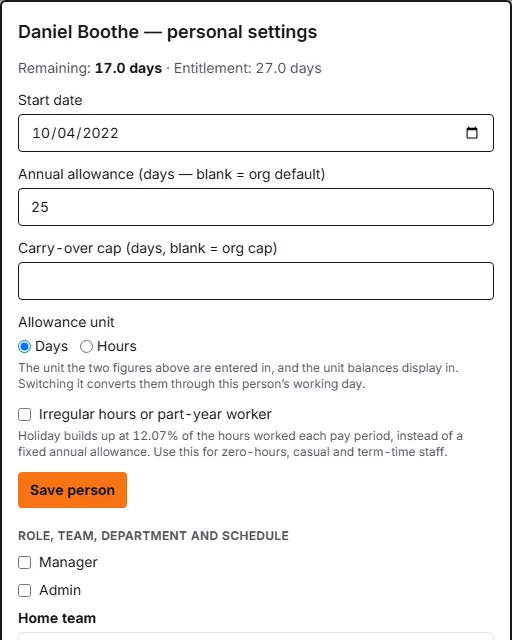
Open People and click the person’s name (or pick Personal settings from the row’s ⋯ menu). The panel shows their current Remaining and Entitlement, and lets you set (Save person saves the start date, allowance and cap):
- Start date — allowances pro-rate automatically for mid-year starters.
- Annual allowance — blank means “use the org default”.
- Carry-over cap — blank means “use the org cap”.
- Allowance unit — Days or Hours, per person. This is not only a display choice: it decides how the allowance and carry-over cap above it are read. Set to Hours, an allowance of
218.4means 218.4 hours. Switching the unit converts both figures through the person’s working day, so their entitlement does not change. Every control on this panel is listed in the People → Personal settings reference.
Leave in advance
If your policy lets people take holiday before they have accrued it — common where leave builds up from hours worked — set Leave in advance in the Leave allowances card on Settings → Leave: how far below zero a balance may go (0 means off), and, once that is above zero, After (months’ service), how long someone must have been employed first. Anyone who qualifies can then request past their accrued leave up to that limit; the request still goes to their manager as normal, and the approvals list marks it in advance. Their balance shows as negative and recovers as they accrue.
The service check uses each person’s start date, so someone without one can’t book in advance until an admin fills it in — the settings card says how many people that affects. Someone with a last day of employment on record can’t book in advance either: there is no future accrual to repay it from. A negative balance at the end of the leave year carries into the next one, and on until it is repaid; it isn’t written off.
Manual adjustments
The same panel takes manual adjustments — an amount (positive or negative, in the person’s unit), the leave year it applies to (picked from their leave years) and an optional reason. Use these for one-off corrections: buying/selling holiday, an agreed bonus day, fixing an import. Always give a reason: each adjustment is listed with whatever was typed there, and that is the only trail that explains the maths. Remove takes one back out.
What does the maths for you
- Working patterns pro-rate a Days allowance — a person on a 3-day working-hours template gets 3/5 of the allowance, automatically (a week longer than five days earns the full-time figure, not more). Someone whose pattern repeats over up to four weeks is pro-rated on the average: 14 hours one week and 20 the next counts as 17 hours a week, every week. An Hours allowance is not scaled by the pattern: 218.4 hours stays 218.4 hours.
- Half days on a Days allowance all cost the same: a worked morning or afternoon is priced at the person’s average half day (weekly hours divided by the half-days they work), however long that particular block is. On an Hours allowance a half day costs the length of the block.
- Irregular hours or part-year workers (a tick on their Personal settings) build up holiday at 12.07% of the hours worked in each pay period instead; see the People → Personal settings reference.
- Starters pro-rate from their start date — by whole months (the gov.uk calculator method) or by exact days, chosen once for the organisation under Pro-rate new starters by on Settings → Leave (see the Settings → Leave reference); leavers pro-rate to their last day, with the accrued-at-leaving figure surfaced in the Balances report.
The Balances report flags anyone whose entitlement is below the statutory minimum, rather than quietly raising it.