Book time off
Request leave in Rotaleave — full days, half days or hours with 15-minute precision — and see exactly what it deducts before you submit.
Updated 13 October 2026
Go to My leave and click + Book time off (the Today page has the same button, the wall chart’s day popup has + Book this day, and your year calendar has + Book leave).
Fill in the request
- Leave type — pick from your organisation’s list (Annual leave, Sick leave and so on).
- Duration — Days or Hours, shown only for a leave type that can be booked in hours. In a default set-up that is every ordinary type, because Allow half-day and part-day bookings and Allow bookings in hours are both on out of the box; switch the hours one off and staff still get mornings and afternoons but there is nothing to choose here, so the radio isn’t there. TOIL follows its own TOIL is taken in setting. See Half days and hours may not be available.
- Days — a Start date with All day or Afternoon beside it, and an End date with All day or Morning. The end date fills itself in from the start date until you set one yourself, so a single day off is one date typed, not two. A half day is a single date that starts in the Afternoon or ends in the Morning; you can’t ask for both on the same date, and the form says so rather than sending it. The two part selects are hidden wherever half days aren’t available.
- Hours — one date with a start and end time, in 15-minute steps. Perfect for a dentist appointment. Only for types booked in hours.
- Reason (optional) — free text for your approver.
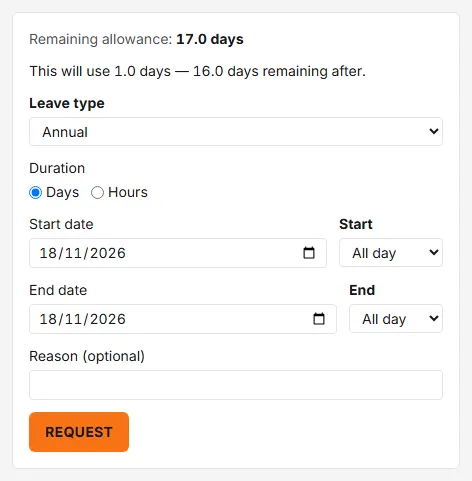
Above the form you’ll see your remaining allowance and a live deduction quote — “This will use 1.0 days — 11.0 days remaining after.” — in whichever unit your allowance is kept, days or hours. Hours-mode requests show their own preview instead: “This will deduct 1h 30m (0.2 days)”. Only time inside your scheduled hours deducts — if the whole booking falls outside them, the form warns you it won’t deduct anything.
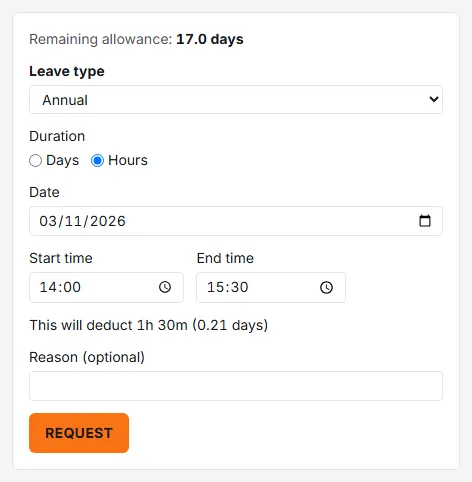
Click Request. Your approver is notified, you go back to My leave, and the booking appears in your list as Pending (a leave type that doesn’t need approval is approved straight away — unless you’re a member of staff and the request would breach a blocking coverage rule or your department’s limit on people off, when it waits for a manager). On the wall chart a pending request is drawn with a dashed outline — on your own row, and to managers and admins; colleagues only see leave once it’s approved. You’ll get an email when it’s approved or declined — controllable in your notification preferences.
Things that can stop a request
- Notice period — if your organisation requires minimum notice (Settings → Leave → Notice period) you’ll see “This request needs at least N days’ notice — you gave M.” It applies to requests for a future date that draw on an allowance, and admins are exempt.
- Not enough allowance — “This exceeds your allowance — X remaining, this needs Y.” Admins can override with a reason; managers and staff can’t. If your organisation accrues monthly, this is measured against what you’ll have accrued by the dates you’re booking, not what you have today. Where your organisation allows leave in advance, the message says how far below zero you can go — or, if you don’t qualify yet, when you will (“available after N months’ service”) or that your start date needs recording first.
- Already booked — “Overlaps an existing Pending booking, Thu 17 Sep.” A request can’t cover time that a Pending or Approved booking of yours already takes; amend that booking instead.
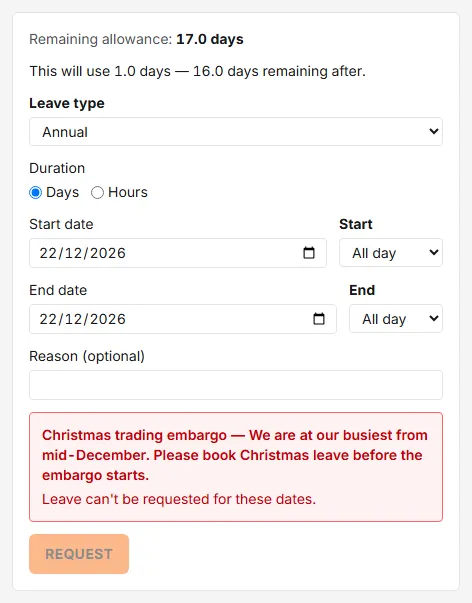
- Leave embargo — during a blackout period new requests are blocked (or flagged, if the embargo is warn-only). Staff can’t get past a blocking embargo; a manager or admin can override it with a reason. Sickness is never embargoed.
- Past dates — you can’t start a booking before today (“Bookings can’t start before …. Ask an admin to record historic leave.”). A manager booking for someone else can reach back to the first day of the current leave year; an admin can record leave from any earlier date, after a confirmation.
Managers and admins additionally get a Check coverage button that previews any coverage-rule breach the request would cause (the same check runs by itself as you fill the form in). A breach of a blocking rule brings up an Override this breach switch and a reason field. The preview does not cover the department’s limit on people off: a request made by a manager or admin that breaks only that limit is refused (“This request breaches a coverage rule.”) with no override on this form. If the leave is for a member of staff, have them send the request themselves — it arrives Pending, and an approver can approve it over the limit, with a reason, on the Approvals page.
Booking for someone else
Managers and admins can book leave in another person’s name. At the top of the form, Who is this for? lists you and everyone you are an approver for (or cover for) at any tier — not only the people whose requests reach you first. An admin sees everyone who hasn’t been archived, apart from anyone whose leave a privacy block hides from them. You can also start from People → ⋯ → Bookings → Book leave for …, by clicking an empty day on that person’s row of the wall chart, or from the rota (click their cell and choose Book leave instead). The form’s heading and button then name them (“Request leave for …”, “Book leave for …”), so a wrong pick shows before you submit. The picker isn’t there when you amend an existing booking.
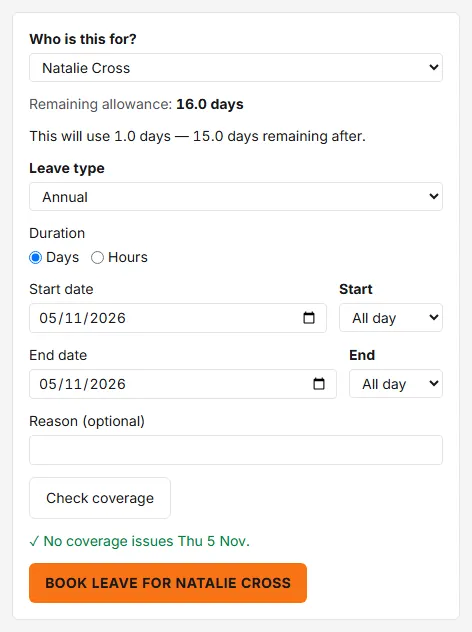
- The same rules apply as for your own request (allowance, notice, embargo, coverage), apart from the past-dates rule above.
- If the request would come to you first, booking it records your approval: when that completes the approval it’s approved at once, and if another approver is still needed it stays Pending. In that case the remaining approvers are not sent the arrival email, the push notification or a Teams or Slack message; the request is on their Approvals page all the same, and in their daily summary if they receive it. If it would go to someone else first, nothing is recorded for you, they are notified in the usual way and it waits with them. An admin’s booking is approved outright, and a leave type that needs no approval is approved at once whoever books it.
- The person gets an email, “Leave has been booked for you”, saying who booked it and whether it is approved or awaiting approval. There is no preference to switch this email off.
- When you submit you land on the wall chart; a booking made from the rota keeps you on the rota.
Booking TOIL
If your organisation uses TOIL, pick the TOIL leave type and the form quotes the request against your banked hours: “This request: Xh TOIL · Yh TOIL remaining after.” Whether you can book TOIL by the hour, in half days or only in whole days is your organisation’s choice — see TOIL.