Email notifications and digests
Choose exactly what Rotaleave emails you — approvals, changes to your leave, daily and weekly who's-off digests, TOIL and timesheets.
Updated 13 October 2026
Most of the emails Rotaleave sends about your own leave and approvals can be switched off, per person. Open your Account page and find the card titled “Email me when…” — flip the switches, then Save preferences. The mobile app’s Settings tab has a shorter list covering the leave and approval emails. Every switch starts on.
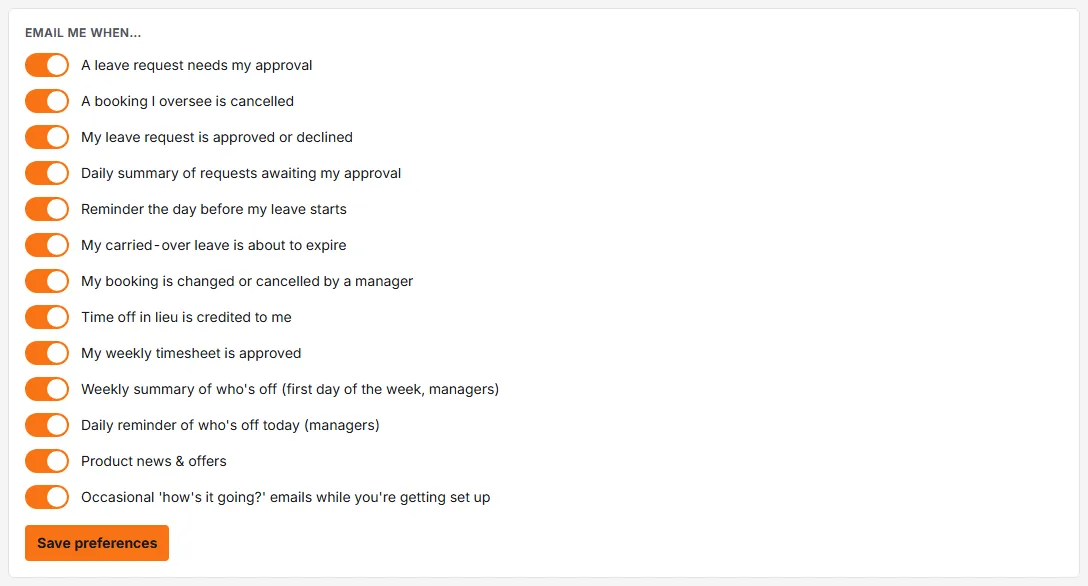
The switches
Event emails:
- A leave request needs my approval — the approver’s workhorse.
- My leave request is approved or declined — the requester’s answer.
- My booking is changed or cancelled by a manager — so you hear when someone else touches your leave.
- A booking I oversee is cancelled — for approvers who want to know.
- Reminder the day before my leave starts — the friendly nudge.
- My carried-over leave is about to expire — use it before you lose it (see carry-over).
- Time off in lieu is credited to me — when TOIL lands in your bank.
- My weekly timesheet is approved — when your hours are signed off.
Digests (summaries instead of one-email-per-event):
- Daily summary of requests awaiting my approval — one morning email covering your whole queue.
- Weekly summary of who’s off (first day of the week, managers) — sent on the first day of your organisation’s week (Monday unless an admin has changed it), covering that week’s weekdays.
- Daily reminder of who’s off today (managers) — the day’s absences on weekdays, in the morning.
Two more switches cover mail from Rotaleave itself:
- Product news & offers
- Occasional ‘how’s it going?’ emails while you’re getting set up
The digests go to admins (whole organisation) and to managers of a department (that department’s people); they are only sent when there is something to report in your slice, and the daily one skips weekends and organisation closure days. They go out from about 07:00 in the organisation’s local time, and the who’s-off lists include people who have been invited but haven’t signed in yet. The approvals summary is only sent when you have something awaiting your approval. Switches only matter where they apply — the manager digests do nothing for someone who manages no one.
Emails you can’t switch off
Some emails are operational, so they have no switch: billing emails to admins (trial ending, payment failed, subscription ended), rota emails (a published rota, shift changes, open shifts and swaps), approver-cover (delegation) notices, a manager or admin booking leave in your name, requests from an admin to set your kiosk PIN, punch-exception alerts to managers, webhook-endpoint alerts to admins and the scheduled reports someone has set up for you. Reminders to people who were invited but haven’t signed in aren’t on the Account page either. The unsubscribe link in those reminders (and in product news and the set-up emails) switches off all three kinds: invite reminders, product news and the ‘how’s it going?’ emails.
Beyond email
- Have the mobile app signed in? Most of the same notifications also arrive as push notifications on your phone, sent once the email has gone out. Turning an email switch off stops that notification too. Billing emails, scheduled reports and invite reminders don’t send a push.
- Connected to Slack or Teams? Notifications can reach you there too.
- Want recurring reports rather than personal notifications — a monthly balances email, say? That’s scheduled email reports.