Check your leave balance
Where to see your entitlement, approved, pending and remaining leave in Rotaleave — in days or hours — plus carry-over and TOIL balances.
Updated 13 October 2026
Open My leave. The allowance card at the top shows your current leave year (for example “Allowance — 1 Jan – 31 Dec 2026”) with four figures:
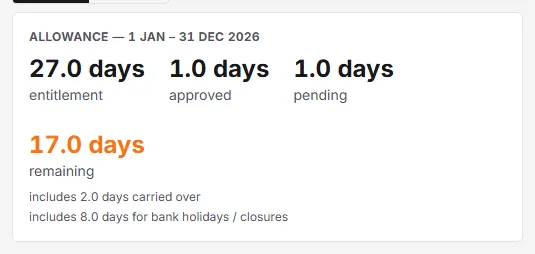
- entitlement — your total for the year, including any carry-over (it reads “accrued so far” instead if you build holiday up as you work);
- approved — leave a manager has granted;
- pending — leave you have requested that nobody has decided yet. It shows even at zero;
- remaining — what’s left to book. Approved and pending both come off it, so a request reduces “remaining” the moment you send it.
The dates follow your organisation’s leave year (Settings → Leave → Leave year). Above the card, This year | Next year switches to the following leave year’s allowance.
Footnotes appear when they apply: “includes X carried over” (or “includes X borrowed from last year” if you ended the last year in debt), and “includes X for bank holidays / closures” (when your organisation deducts bank holidays from allowances). On Next year, if your organisation carries leave over, a note says leave you don’t use this year is added when this year ends, with the cap if there is one.
A negative remaining figure means you’ve taken more than you’ve accrued so far. Where your organisation allows leave in advance and you qualify, the card says how much is in advance. It recovers as your leave accrues (for hours-based accrual, as you work), and with leave in advance on, a year that ends still negative carries the shortfall into the next one — and on until it is repaid — rather than writing it off.
Days or hours?
Balances display in days or hours depending on your display unit — hover any figure for the same amount in the other unit. Admins can switch a person’s unit from People → ⋯ → Personal settings → Allowance unit; hours suit people on irregular patterns who book hourly leave.
TOIL balance
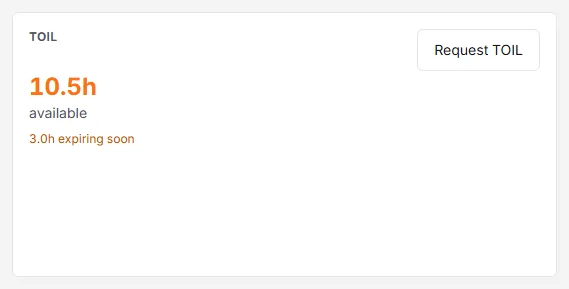
If your organisation uses TOIL, a separate TOIL card shows your banked hours as available, with an amber warning when credits are expiring soon. TOIL is always shown in hours. If your organisation allows a negative TOIL limit and you have used it, the figure turns amber with a “Below zero” note.
When something looks wrong
- Your working pattern drives the maths — a part-time pattern pro-rates the allowance, and leave only deducts on scheduled days. Check with an admin that your working hours are right.
- If your organisation accrues allowance monthly, “remaining” grows through the year rather than starting full.
- Admins can see anyone’s balance in the Balances report, and adjust entitlement with a manual adjustment (an amount for a chosen leave year, with an optional reason) from People → ⋯ → Personal settings.