The who's-off wall chart
Read the Rotaleave wall chart: rolling weeks and month views, half-day blocks, pending vs approved, embargoes, closures and coverage.
Updated 13 October 2026
The Wall chart is the shared picture of who’s off. Everyone can open it — what each person can see on it depends on your organisation’s privacy setting. Each person still on the books has a row, including people who have been invited but haven’t logged in yet; archived people don’t.
Views and navigation
Two views, toggled top-right:
- Weeks (default) — a rolling grid, one row per person: eight weeks on a desktop, four on a phone. A full day is one block; a morning or an afternoon is a half-block on its own side of the cell.
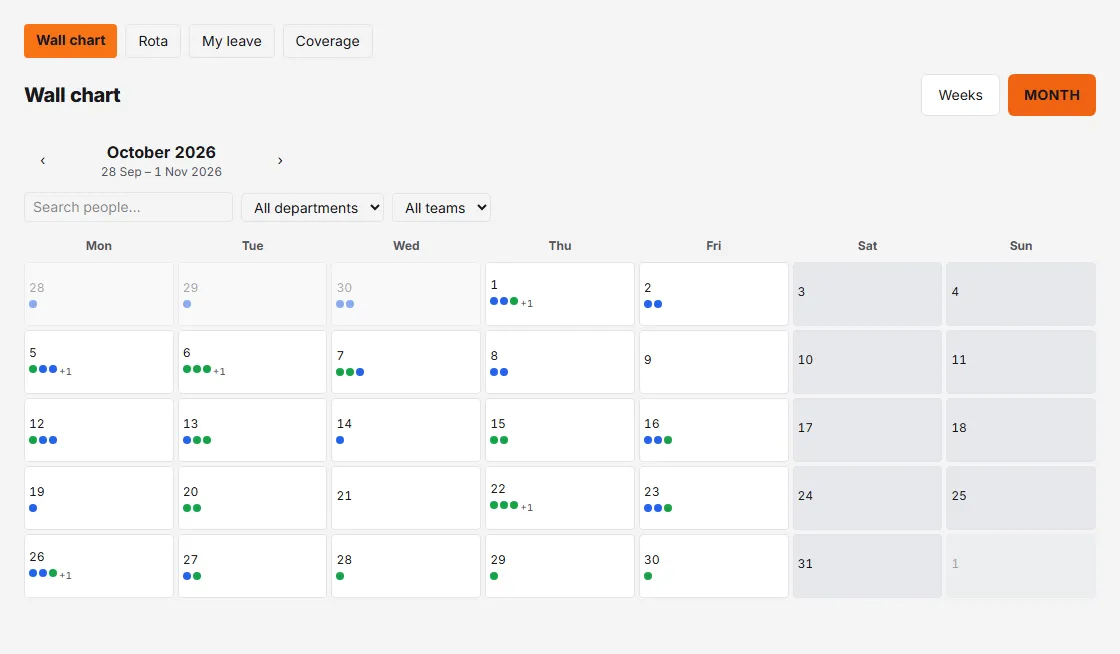
- Month — a calendar grid with colour dots for who’s off each day (up to three, then “+N”).
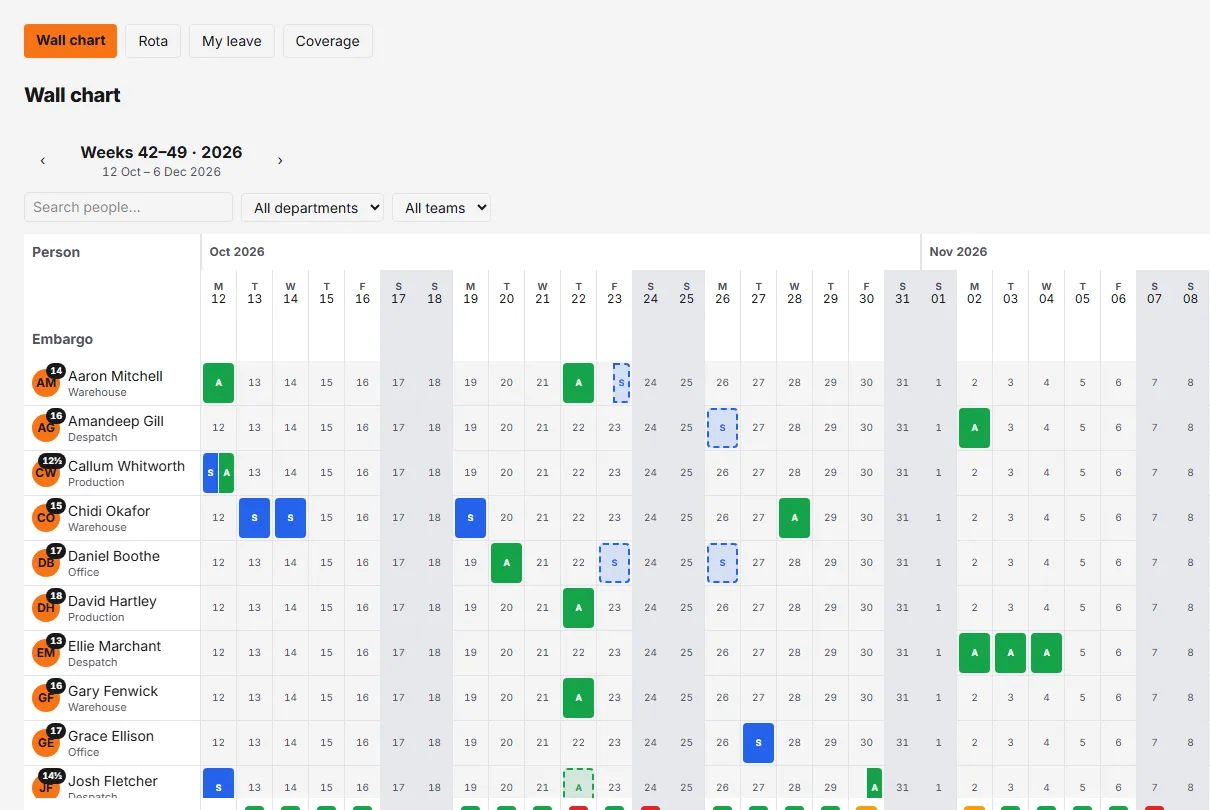
Use the ‹ › arrows to move through time. Filter with the search box and the department and team dropdowns (a dropdown only appears once your organisation has departments, or an active team) — the header shows “x of y people” while filtered.
Reading the grid
- Solid coloured block — an approved full day, coloured and initialled by leave type (hover for the name).
- Half-block — a morning fills the left half of the cell, an afternoon the right. Two different types on one day sit side by side.
- Dashed outline — a request still awaiting approval, tinted in its own colour rather than filled in. You see these on your own row only: a colleague’s leave appears once it is approved, and pending requests are drawn on every row for managers and admins, who are the people who can decide them.
- Outlined chip — an hours-mode booking; hover shows the time range.
- “Away” — a dark block with no letter: someone is off, but the org’s visibility setting keeps the leave type from you.
- A day number — nothing booked that day.
- Closed / Hol badge — in the day-number header at the top of the column: Closed where the business shuts, Hol for a bank holiday it works through, named on hover. A closed day’s whole column is shaded, top to bottom.
- Embargo row — red Embargo or amber Embargo (warn) stripes where a blackout period applies (only when the blackout dates feature is on).
- Coverage row — managers (and staff, if the admin enables “Show coverage to staff”) see ✓/⚠/✗ marks flagging coverage gaps.
Weekends and closure days are shaded, and the legend underneath decodes every leave-type colour plus “Dashed = awaiting approval” and “Shaded = weekend, non-working day or closed”.
The person column
Every row begins with the person’s avatar, their name on one line and their department underneath. The figure in the corner of the avatar is their remaining allowance in days, worked out as of today: managers and admins see it on everyone, staff only on their own row.
Click a name to open that person’s year calendar — January to December on one screen, drawn with the same blocks as the wall. The wall stays underneath with your filters intact, and closing the calendar puts you straight back on it. You can reach the same calendar from Year at a glance on My leave, and from People → ⋯ → Year calendar.
The day popup
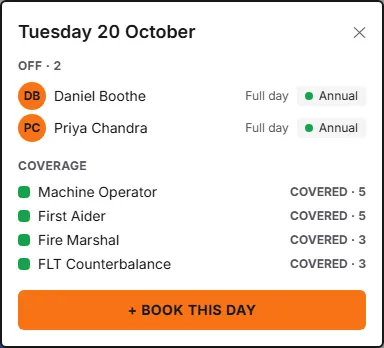
Click a date at the top of a column (or a day in Month view) to open it. You’ll see everyone off that day (“Off · 3”) with Full day, Half day · AM/PM or a time range against each name, a coverage breakdown if you can see coverage, and a + Book this day button that jumps straight into a pre-dated leave request for yourself.
Clicking a booked day on someone’s row opens that booking instead: the leave type, the dates, the part of the day and whether it is approved or awaiting approval — with a Review in Approvals link for managers and admins when it is still pending. Clicking an empty day on the row of someone you can book leave for (managers and admins, for the people whose requests come to them) offers Book leave for … instead; see Book time off.
Who sees what
Admins choose one of four levels in Settings → Organisation → Who can see staff leave: Everyone sees all leave; Private leave types hidden from staff (the default — those show as “Away”); Staff see only that someone’s away; or Staff see only their own leave. You always see your own leave in full, and managers and admins see full detail for everyone else.
Two things sit on top of that. Once your organisation has an active team, staff see leave only for people who share a team with them, whichever level is chosen. And an admin can hide one person’s leave from a named colleague with a Privacy block (Settings → People & structure) — that hides it even from a manager or admin.