Blackout periods
Embargo leave over critical dates in Rotaleave — block or warn on new requests, scoped to the whole org, a department or a team.
Updated 13 October 2026
Blackout periods (leave embargoes) stop new leave requests landing on dates you can’t afford to lose people — Christmas trading, stocktake, a product launch. They’re an organisation feature, Blackout dates, that an admin switches on in Settings → Organisation → Features. Once it’s on, admins manage embargoes at Settings → Leave → Blackout dates / embargoes.
The ground rules
- Embargoes affect new requests only — existing bookings are never cancelled by adding one.
- Sickness is never embargoed. Beyond that, an embargo is only enforced on leave types that mark the person absent or use up allowance, and one that falls only on days the person doesn’t work is ignored. The web request form is stricter: it shows a blocking embargo for every leave type except sickness, so staff can’t submit past it and a manager or admin has to switch on the override and give a reason.
- Staff cannot override a blocking embargo; managers and admins can, with a recorded reason.
Create an embargo
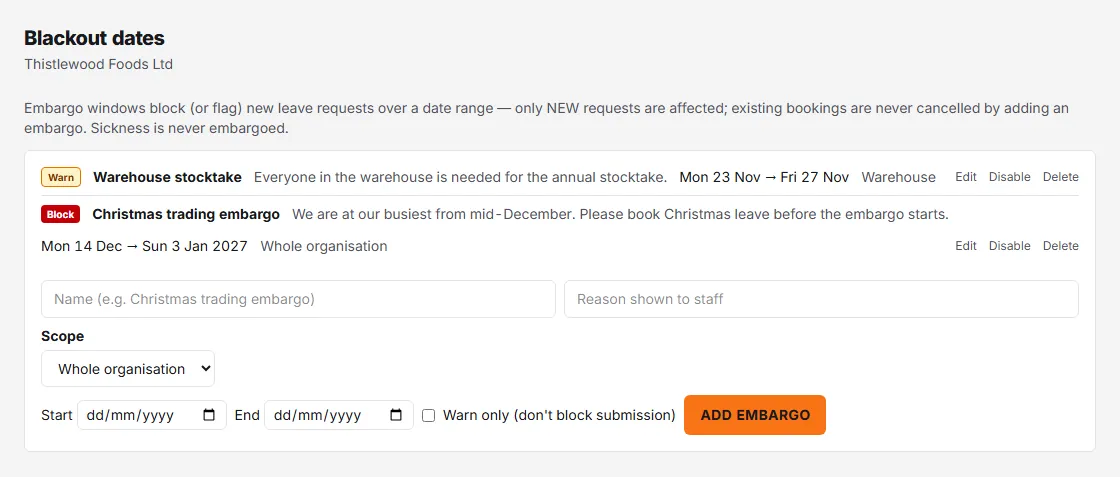
Fill in the form and click Add embargo:
- Name — e.g. “Christmas trading embargo”.
- Reason shown to staff — the explanation people see when their request is blocked.
- Scope — the whole organisation, one department, or one team. A department embargo applies to people whose own department it is; a team embargo to members of that team.
- Start and End dates.
- Warn only (don’t block submission) — tick to flag rather than forbid.
Block vs warn
- Block (the default, red badge) — staff requests overlapping the window are stopped with “This request falls within a leave embargo and can’t be submitted.” Managers see the embargo too but can override with a reason.
- Warn (amber badge) — requests go through, but the person making the request sees a warning with the embargo’s name and reason.
Managing embargoes
Each row shows its badge, name, reason, date range and scope, with Edit, Disable/Enable and Delete actions. Editing only affects new requests. An embargo that has already been used to override a booking can’t be deleted — disable it instead, which keeps the audit trail intact.
Embargo windows also appear on the wall chart as a dedicated Embargo row, so everyone can see protected dates before they even try to book.