Privacy blocks
Hide one person's leave from a named colleague, even a manager or admin: what a block covers on the wall chart, approvals and emails, and what it misses.
Updated 13 October 2026
A privacy block hides one named person’s leave from one named viewer in the places listed below. It does not hide it everywhere, so read what it doesn’t change before relying on it. Use it for a conflict of interest or a confidential situation where an approver or colleague shouldn’t see why or when someone is off. It works even when the viewer is a manager or an admin.
Add or remove a block
Admins only. Go to Settings → People & structure → Manage → Privacy blocks. Pick the person in Whose leave…, pick the colleague in Viewer…, and click Add block. Existing blocks are listed as “Name → hidden from Name”, each with a Remove link. You can’t block someone from themselves, and adding the same block twice changes nothing.
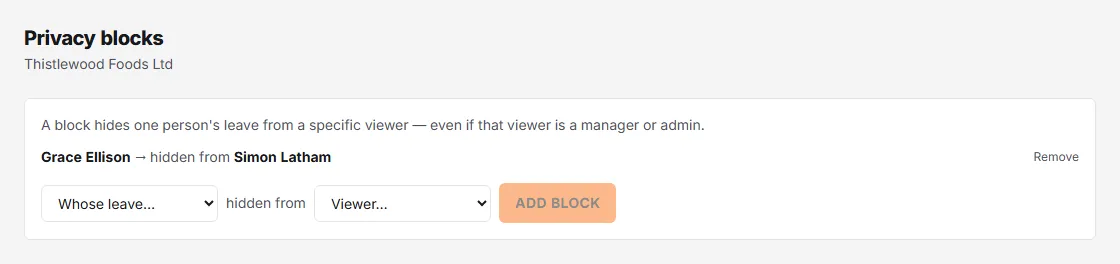
A block goes one way. Blocking A’s leave from B does not hide B’s leave from A, and nobody else is affected. A person always sees their own leave.
What a block hides from the viewer
- Schedule → Wall chart, including a person’s year calendar, and the who’s off today list on Today.
- Calendar feeds (the iCal links) built for that viewer.
- Approvals. The request doesn’t appear in the viewer’s inbox, and if they try to approve or decline it directly the server refuses. The block applies to admins too, so a blocked admin can’t approve either. A blocked manager or admin also can’t book leave for that person, or cancel or change their bookings. Make sure someone you haven’t blocked can still decide the person’s requests.
- Emails. The viewer isn’t sent the approval-request email for that person’s leave, and neither is anyone covering for them under approval cover.
- Timesheet board. Where the viewer reviews that person’s timesheet, their leave is left off.
What it doesn’t change
- It doesn’t cancel, edit or re-route anything already booked. The requests still go to everyone else who can approve them.
- It doesn’t reach every place a manager or admin can see leave. A blocked manager or admin still sees the person’s leave in the who’s-off digest emails they receive, in Reports, and under People → ⋯ → Bookings.
- It sits on top of Who can see staff leave in Settings → Organisation; it only ever hides more, never less.
See Approve or decline requests for how requests reach approvers.