Invite your team
Invite people to Rotaleave one at a time or in bulk with the staff CSV — roles, departments, start dates and allowances explained.
Updated 13 October 2026
Only admins can invite people. Head to People and click Invite person.
Invite one person
The invite form asks for:
- Email — where the invite lands, and their login.
- First name and Last name.
- Role — Employee, Manager or Admin (default Employee). Managers see People (which includes Skills), Approvals and Reports, plus Timesheets when clock-in is on; admins also get Settings.
- Department (optional) — or leave as “No department” and sort it later.
- Start date — defaults to today. Allowances pro-rate from this date for mid-year starters.
- Annual allowance (optional) — leave blank for the org default.
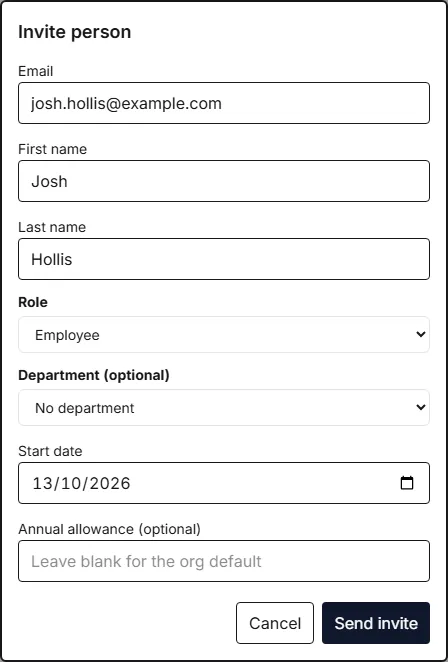
Click Send invite. The person gets an email with a link — its subject names you and your organisation (“Dan Golding invited you to Cab Call Centre on Rotaleave”) so they know who it’s from; following it asks them to Set your password (12+ characters, entered twice) and tick the box agreeing to the Terms of Service and Privacy Policy. If your organisation uses clock-in, it also asks them to choose a 4-digit Kiosk PIN for the tablet — unless they are in a department set to not need one (see Departments and teams). It then drops them straight into the app.
A few things worth knowing:
- Invite links last 7 days. If one expires, the person can click Send me a new link on the page, or you can resend it.
- Reminders. Until they accept, or unsubscribe from the reminders, the person is sent reminder emails, each with a fresh link, 2, 7, 14, 30, 60, 90 and 120 days after the invite. Resending an invite from People restarts that count; the person asking for a new link themselves does not.
- Invite not arrived? Ask the person to check their Junk or Spam folder — Hotmail and Outlook addresses in particular sometimes file a first email from a new sender there. Marking it Not junk fixes future emails too. To send a fresh link, click Invite pending — Resend beside their name on People, or tick them and choose Resend invite. Only admins can do either.
- The form shows the same deliberately generic message (“If that email is valid, an invite has been sent.”) whether or not the invite went out, so the message alone doesn’t prove one was sent. If nothing arrives, check the person is listed on People with Invite pending — Resend beside their name and resend from there; if they aren’t listed, invite them again a little later (the form accepts 5 invites to one address, and 20 from one network, in 15 minutes). The only errors the form names are an address that already belongs to someone in your organisation, or to an account in another organisation, so you can correct it.
- Before they accept, an invited person can already be put on the rota, appears on the wall chart, and is listed in the who’s-off email when they have approved leave.
- If the email matches someone you previously archived, Rotaleave offers to Reinstate them instead of creating a duplicate — see Archive and reinstate people.

Invite in bulk with the staff CSV
For a whole team at once, use the Staff CSV import — it’s the Your people step of the setup wizard, and the Import / Migrate button on the People page leads to it too (also under Settings → Data).
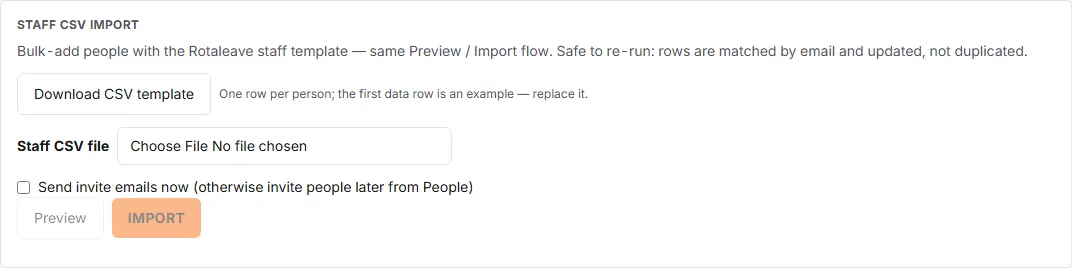
- Click Download CSV template and fill it in. The Mon–Sun columns take Full, AM, PM or Off; leave all seven blank for Mon–Fri full-time (once you fill in any of them, a blank day counts as off). Part-time and half-day patterns pro-rate the allowance automatically. Role defaults to employee and allowance to the org default if you leave those out.
- Tick Send invite emails now if you want invites to go out immediately — otherwise you can invite people later from the People page. Be aware that anyone still waiting to accept is sent the reminder emails described above, starting 2 days after they were created, even if you left this box unticked.
- Click Preview. Nothing is written yet — you get a table of what would be created, updated and skipped.
- Click Import.
Re-uploading the same file is safe: rows are matched by email and updated, not duplicated, and invite emails go only to people the import newly created. If some invite emails fail to send, the importer lists who to re-invite from the People page.
Seats and billing
Everyone who isn’t archived counts as a person for billing — including people who’ve been invited but haven’t signed in yet. Rotaleave is free up to 10 people; see Billing and seats.