Import from Breathe HR
Move from Breathe HR with the Employees report and an optional Absence report — holiday and sickness both come across, previewed before import.
Updated 13 October 2026
Rotaleave reads Breathe HR report downloads directly — CSV or Excel. Importing is admin-only, from Settings → Data → Import / Migrate, the People page’s Import / Migrate button, or during onboarding on the Your people step — set Source to Breathe HR.
Get your Breathe exports
- Log in to Breathe as an admin.
- Go to Reports → Employees and download it — required.
- Optionally download an Absence report for the date range you want — it covers holiday and sickness, and both come across.
Breathe’s API is partner-gated rather than self-serve, so the file export is the supported route.
What comes across
| Column | Becomes in Rotaleave |
|---|---|
| Work email | identifies the person (must be unique) |
| First name / Last name | Name |
| Department | Department |
| Line manager | Manager role — anyone named here who is also in the file becomes a manager |
| Start date | Start date |
| Holiday allowance | Annual allowance (in your organisation’s unit, days or hours) |
| Employee number | links leave rows to the right person (and flags duplicate IDs) |
| Status | Active, or archived for leavers |
| Type | Leave type (created if missing) — holiday and sickness both |
| Start date / End date | Start/end dates |
| Half day | Half-day/day-part |
| Reference | used to keep re-runs safe |
Not imported: remaining balances — enter opening adjustments after migrating — and job title (recognised, but Rotaleave doesn’t store one). Anything else the importer doesn’t recognise is listed as a warning, never dropped silently.
Working days: the file has none, so everyone starts on Monday to Friday, full days — unless their department already has a default working-hours template in Rotaleave, in which case they get that. Set proper working hours templates afterwards.
Leave types: new ones are created as needing approval, and whether each comes off the allowance is guessed from its name. Only a type called exactly Sick, Sickness, Sick leave, Unpaid, Unpaid leave, Bank holiday or Personal/carer’s is set not to (capitals don’t matter); every other name, such as Sickness absence or Maternity, is set to come off the allowance. The preview lists every guess as a warning, so read them before you import.
Preview, then import
- Upload the Employees file (and the Absence file if you have one).
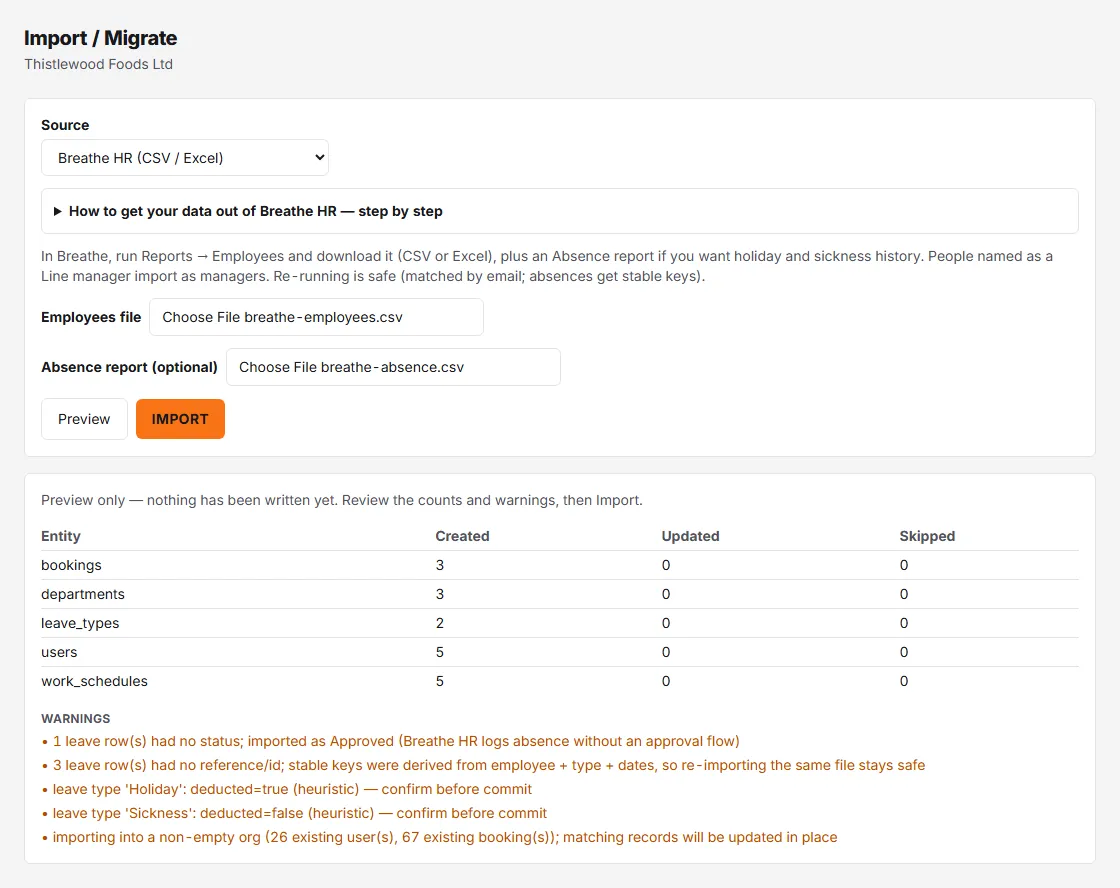
- Click Preview — nothing is written yet. You get Created / Updated / Skipped counts per entity plus any warnings.
- The Import button stays disabled until a preview exists, and while the preview shows row errors — the dry run isn’t optional, by design.
- Happy with the counts? Click Import and look for “Import complete.”
The import is refused if it would leave an organisation with no trial or subscription with more than 10 people, and it can’t be committed from the practice company.
Running it again
People are matched by email and leave records by their reference, so re-importing the same or a corrected file updates rather than duplicates. Nothing is duplicated, but an update puts the file’s values back over what you changed in Rotaleave. This applies just as much to a first import into an organisation that already has people:
- People. A matched person takes the file’s values again — name, department, start date and allowance. A blank start date or allowance in the file blanks it in Rotaleave, and the allowance unit goes back to your organisation’s unit. Their working days are reset to their department’s default working-hours template, or to Monday to Friday if the department has none.
- Roles, including yours. Breathe’s file carries no roles, so everyone in it is set to employee, or to manager if somebody’s Line manager column names them. That includes admins, and it includes you: if your own email is in the Employees file, importing takes away your admin role in Rotaleave — and if you were the only admin, nobody in the organisation can give it back. Take your own row out of the file before you import, or make sure another admin who isn’t in the file can put your role back.
- Archived or not. Status follows the file’s Status column. Someone you archived in Rotaleave who is active in the file is un-archived (back to invited, and counting as a seat); someone the file marks as a leaver is archived.
- Department managers. Every department named in the file has all its managers removed, because the file names none. Put them back under Settings → People & structure → Departments afterwards.
- Leave types. A leave type in the Absence file with the same name as one you already have is overwritten: colour, whether it comes off the allowance (guessed from the name, as above), needs approval (set to yes), private (set to no) and removes presence (set to yes).
Iterate until the preview is clean.
After the import
- Spot-check a few people’s allowances against Breathe.
- Decide your bank holiday policy.
- Invite everyone when you’re ready. Importing sends no invitations itself, but it doesn’t stay silent: anyone imported as a current member of staff who hasn’t accepted is automatically emailed a reminder with a sign-up link 2 days after the import, then at 7, 14, 30, 60, 90 and 120 days. The reminders stop once the person accepts, is archived or uses the unsubscribe link in the email, and none are sent while the organisation is closing. People imported as archived get none. There’s no setting to hold the reminders back, so import when you’re ready for people to hear from Rotaleave.