Set your availability
Tell your manager when you can and can't work in Rotaleave — a weekly pattern plus dated exceptions that guide rota planning.
Updated 13 October 2026
Availability is how you tell the rota planner about your life outside work — the evening class, the school run, the Saturdays you’d love extra hours. It lives on your Account page under Availability, and shows only if availability is switched on for your organisation (it follows the rota unless support has changed it).
One thing to be clear about, in the product’s own words: “This never blocks a shift being assigned to you — it only helps the rota planner rank and badge candidates.” It’s advice to your manager, not a rule.
Your weekly pattern
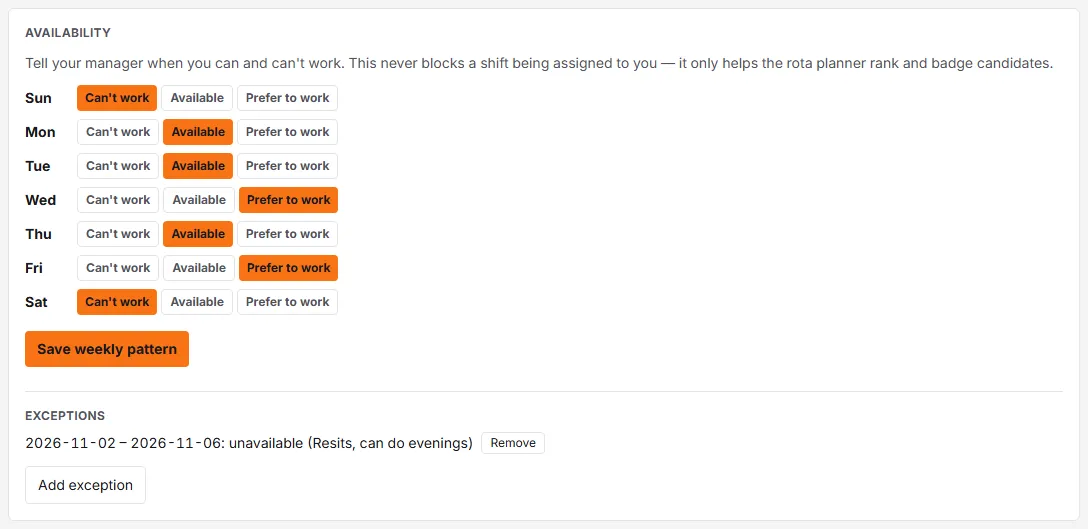
The grid has one row per day, with three choices each: Can’t work, Available, or Prefer to work. Everything starts as Available — change the days that differ and click Save weekly pattern.
Exceptions
For one-off periods that differ from your pattern — exam week, a fortnight of childcare — click Add exception and set:
- From and To dates,
- a Verdict (the same three choices),
- an optional Note (“resits — can do evenings”).
For the dates an exception covers, it replaces your weekly pattern (if two overlap, the newest one counts). Each exception in the list has a Remove button. Availability applies to whole days on the web.
What your manager sees
Managers see it in the candidate picker that lists who could work a shift: each person is badged ● Preferred (green), Available, Not set, or Unavailable (amber). On the person-first rota grid that picker opens in the Areas view, after you add a shift to an area; typing a shift straight into a person’s cell on the People view doesn’t show it. On the earlier rota page it opens from + Assign on a shift. A manager can still pick someone marked Unavailable, but the picker won’t let them pick someone who would be double-booked.
Availability also decides who can see an open shift to claim: someone marked Unavailable for that day isn’t offered it.