Shift swaps
How Rotaleave shift swaps work end to end: one person proposes, the colleague accepts, the manager approves — with clash checks throughout.
Updated 13 October 2026
A swap is a three-step handshake: propose → colleague accepts → manager approves. Nothing changes on the rota until all three have happened. An admin switches Shift swaps on under Settings → Organisation → Features; it is off unless it was ticked during setup, and needs the rota.
1. Propose (staff)
On your Rota page, the Propose a swap form lets you pick one of your own upcoming shifts (Your shift) and the colleague’s shift you want in exchange (Their shift), then press Propose swap. The form appears once you have an upcoming shift, and both lists only contain shifts from published weeks — colleagues’ shifts are listed for the next 28 days. Rotaleave sanity-checks the proposal immediately and refuses anything that would double-book someone or clash with approved leave. The mobile app has the same pick-a-shift flow under Swaps on the Rota tab.
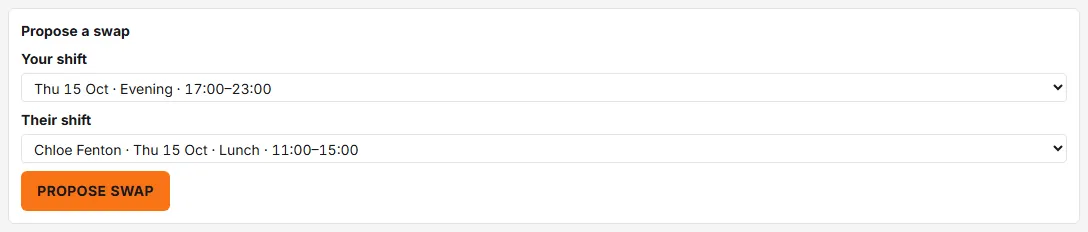
Managers and admins do not get this form on the web, on either rota page — their Rota page is the planning view. They can propose and answer swaps in the mobile app, and approve them on the Approvals page.
You can Withdraw a proposal at any point before the manager decides.
2. Accept or decline (colleague)
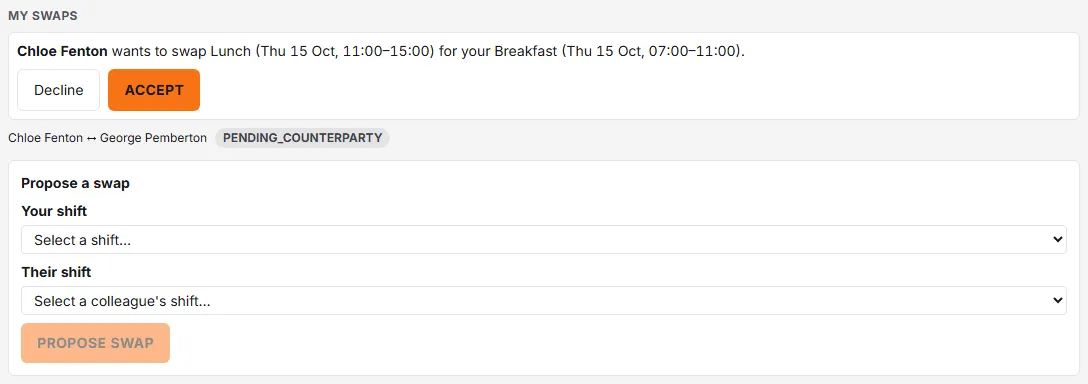
The colleague sees the incoming request in their My swaps section, written out in full: “Alex wants to swap Early shift (Mon 14 Jul, 06:00–14:00) for your Late shift (Wed 16 Jul, 14:00–22:00).” They hit Accept — “Swap accepted — awaiting manager approval.” — or Decline, and that’s the end of their part.
3. Approve (manager)
Accepted swaps appear on the Approvals page as a card showing both people and both shifts. If the swap would leave a skill gap, advisory ⚠ warnings appear — they inform, they don’t block. Approve performs the swap on the rota immediately; Decline (optional reason) sends it back.

Both colleagues can follow the state the whole way: pending colleague → pending manager → approved or declined.