Archive a leaver and their holiday balance
When someone leaves, archive them with their last day and Rotaleave shows the holiday they're owed, or owe back, for the final pay run.
Updated 13 October 2026
When someone hands in their notice, two questions follow: how do I take them off Rotaleave, and how much holiday do we owe them (or do they owe us)? Both are answered in the same place, and it takes about a minute.
1. Open the archive dialog
Go to People, find the person, open the ⋯ menu at the end of their row and choose Archive. It’s the last item in the menu. You need to be an admin or a manager.
2. Enter their last day
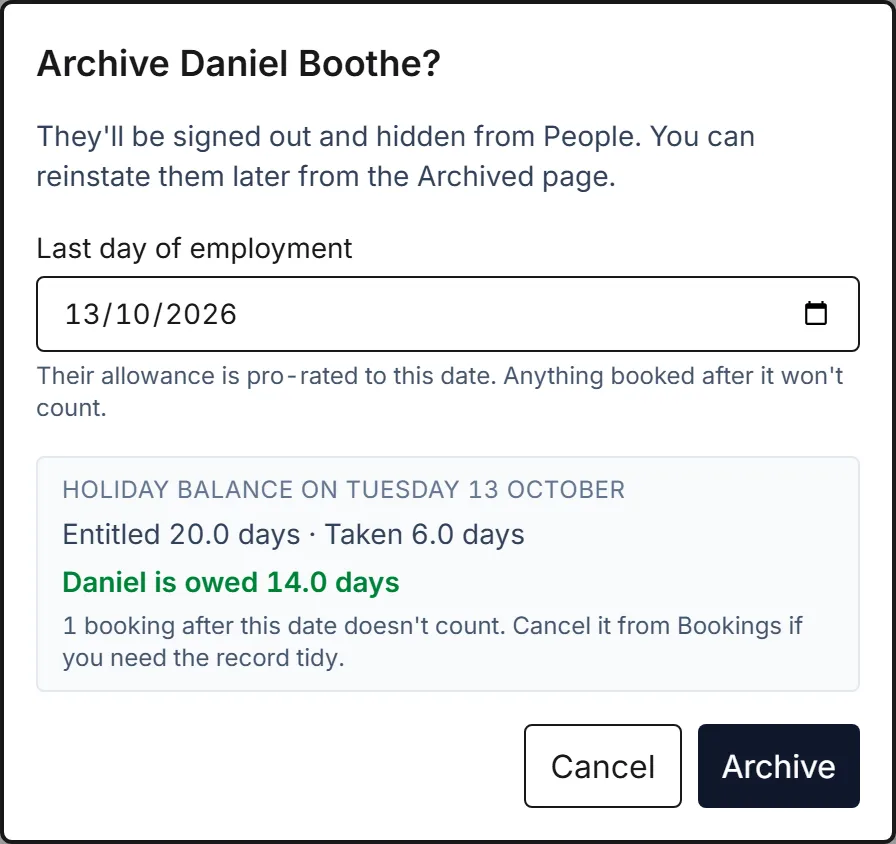
The dialog asks for one thing: their last day of employment. It defaults to today. Type or pick the actual last day — the end of their notice period, say — and the balance below it updates straight away.
3. Read the holiday balance
The panel under the date is the figure for the final pay run:
- Entitled — their allowance pro-rated to the last day, with any carry-over and manual adjustments included. Someone on 28 days who leaves on 30 June is entitled to 14 days, and the pro-rating is to the exact day, not the nearest month.
- Taken — holiday they’ve had up to and including the last day, plus any bank holidays or closure days your organisation deducts from the allowance.
- The line in bold is what matters: “Wendy is owed 3.5 days” means pay for 3.5 days in the final pay. “Wendy owes the company 1.0 days” means they took more than they’d earned by their last day, so you can deduct it (check their contract allows that).
If they have holiday booked after their last day, the panel says so — those bookings don’t count towards the balance. You can cancel them from Bookings on the same ⋯ menu if you want the records tidy, but you don’t have to.
Hours-based allowances work the same way, in hours.
4. Archive
Click Archive. They’re signed out everywhere, hidden from People, and they stop counting as a billing seat. Their history stays.
Nothing is lost if you archive with the wrong date: People → Archived → Reinstate brings them back, and you can archive again with the right day.
Finding the balance later
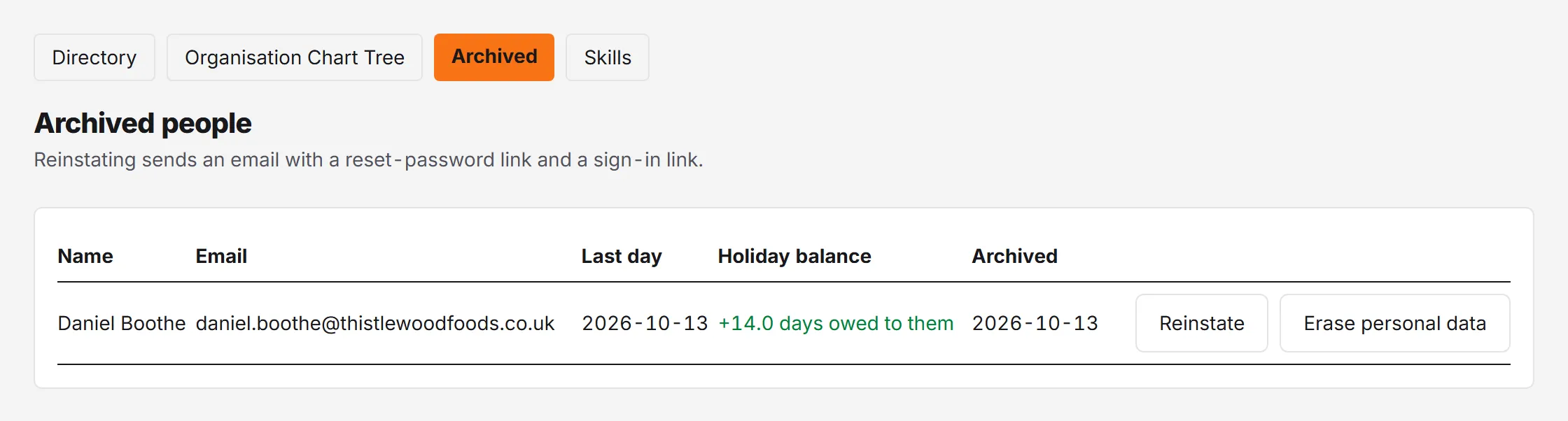
People → Archived lists everyone who has left, with their last day and their holiday balance on that day, so the figure is still there when payroll asks for it a week later.
The same number appears in the Balances report as Accrued at leaving and Remaining, and in its CSV export, for anyone whose last day falls in the report’s date range.
Working it out by hand
If you want to check the figure, Rotaleave uses the statutory method:
- Pro-rate the allowance to the days employed in the leave year:
annual allowance × days employed this leave year ÷ days in the leave year, rounded up to the nearest half day. For 28 days, leaving 30 June in a January-to-December year: 28 × 181 ÷ 365 = 13.9, which rounds up to 14. - Add carry-over and any manual adjustments for the year.
- Subtract holiday taken up to the last day, and any deducted bank holidays up to the last day.
A positive result is owed to the leaver; a negative result is owed back to you. Our free holiday calculator for leavers does the same sum for any dates.
Common questions
Someone archived before we had Rotaleave shows ”—” instead of a balance. People imported as already-archived have no last day recorded, so there’s nothing to calculate. Their balance belongs to whatever system they left under.
Can I set the last day in the future? Not yet — archiving happens straight away and signs them out. Archive on their last day, or the morning after.
The balance looks too low on a monthly-accrual organisation. Check the last day: accrual stops there, so a date earlier than the real last day under-counts. Change the date in the dialog and the figure recalculates.