Earlies, lates and nights
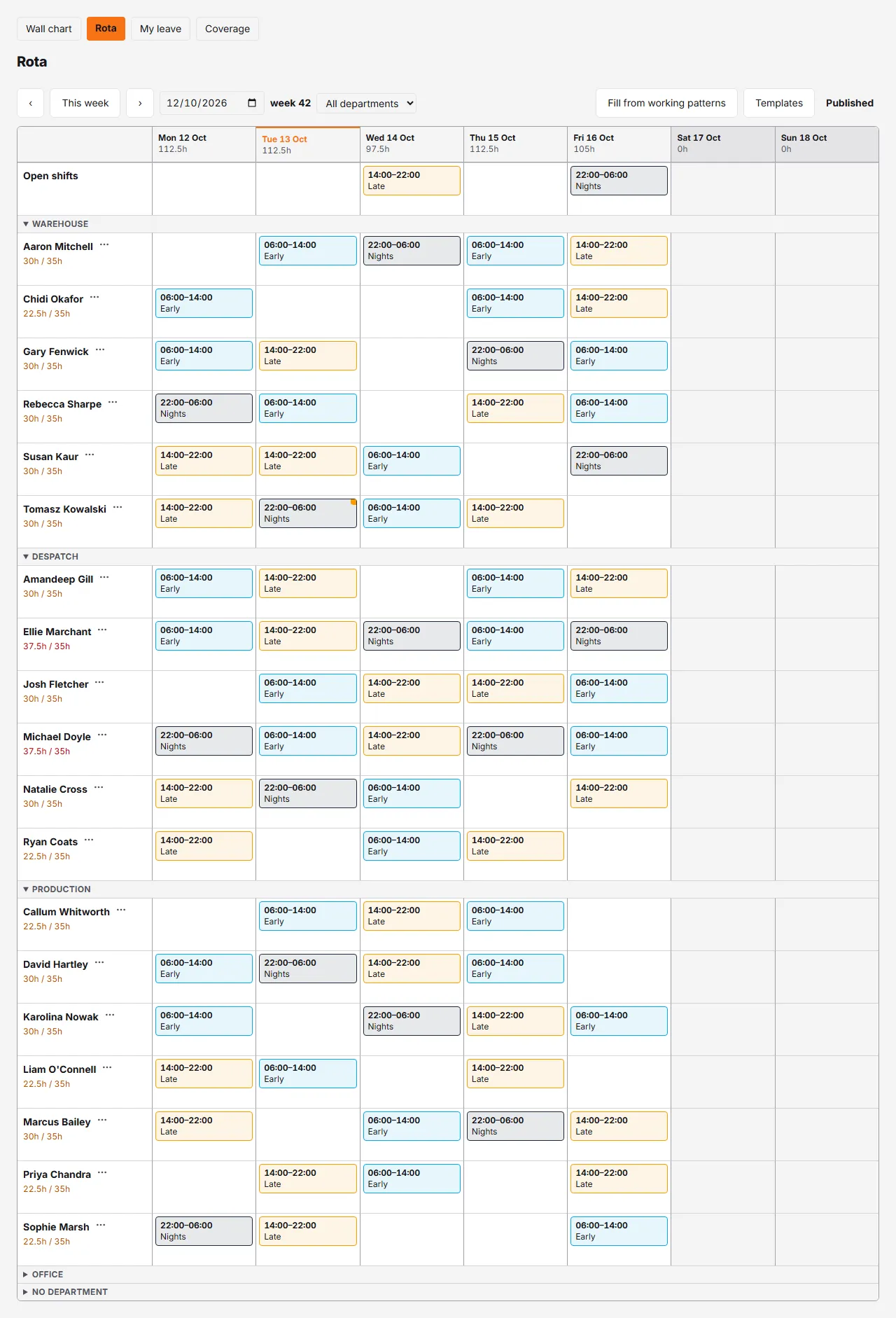
Save Early 06:00-14:00, Late 14:00-22:00 and Nights 22:00-06:00 as shift templates and each becomes a button. A shift that ends after midnight is marked overnight and sits on the day it starts. Give a shift the number of people it needs, and the Publish dialog lists every day that is short before anyone sees the rota. Drag a shift to move it, or hold Shift as you drop it to copy it.
People are grouped by department, such as Goods in, Despatch and Production. Under each name are the paid hours they are rota’d for the week against their contract, so overtime stands out while you plan.
Rotating patterns: what fits and what does not
Rotaleave repeats in whole weeks. Save up to four weeks of shifts as a week template, then apply it from any week, up to 13 times: a four-week rotation fills a year. Each person’s working pattern, which fills the week and prices their holiday, also repeats over up to four weeks. So a pattern fits if it repeats every 7, 14, 21 or 28 days. A weekly swap between earlies and lates fits, and so does a 2-2-3 pattern, which repeats every two weeks. A four-crew continental rota fits if its cycle is one to four whole weeks long.
A 4-on-4-off pattern repeats every eight days, so it does not fit. It lines up with the calendar every eight weeks, though. Build those eight weeks once, then fill each new week with Copy from, picking the week eight weeks earlier. Holiday is harder: a working pattern can only match 4-on-4-off on average. If most of your site works it, talk to us before you set up allowances.
UK working-time rules for shift work
These come from gov.uk (checked October 2026). They apply to workers aged 18 or over unless stated.
- Daily rest: 11 hours between working days. Someone who finishes a late at 22:00 should not start an early at 06:00 the next morning.
- Weekly rest: an uninterrupted 24 hours each week, or 48 hours each fortnight.
- Breaks: one uninterrupted 20-minute break when the shift is longer than six hours.
- The 48-hour week: no more than 48 hours a week on average, normally over 17 weeks. A worker can opt out, but it must be voluntary and in writing, and they can cancel it with at least 7 days’ notice, or up to 3 months if their agreement says so.
- Night workers: anyone who regularly works at least 3 hours between 11pm and 6am. They must not work more than an average of 8 hours in 24, usually over 17 weeks, and cannot opt out of that limit. They must be offered a free health assessment before they start nights and regularly after that.
- Under-18s: no more than 8 hours a day or 40 a week, 12 hours’ daily rest, and no work between midnight and 4am.
Sources: rest breaks at work, maximum weekly working hours and night working hours. Some jobs have exceptions, so check the full guidance. This is general guidance, not legal advice.
What Rotaleave does: it records each shift’s break, shows each person’s rota’d hours for the week, and records the hours actually worked on timesheets. What it does not do: the person-by-person grid does not flag a rest gap under 11 hours, and Rotaleave does not work out the 17-week average, keep opt-out agreements or record health assessments. The earlier rota page, which plans shift by shift and which we can switch you to, flags a rest gap under 11 hours, a week over 48 rota’d hours and a long shift with no break.
Forklift licences and other skills
Add each licence or ticket as a skill, such as FLT Counterbalance or Reach Truck, and tick requires expiry. Give people their skills with a valid-from and an expiry date. A lapsed licence stops counting the day after it expires.
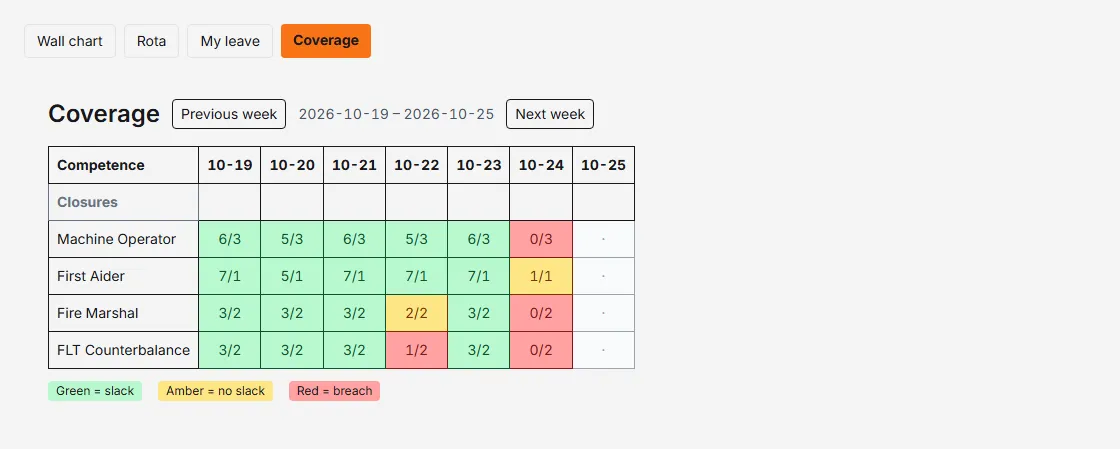
Then set a coverage rule, such as at least two counterbalance drivers working each day. Set it to block, and a holiday request from a driver that would leave fewer goes to an approver, who sees “Approving leaves a gap” before deciding. A manager must give a reason to approve it anyway. A department limit, such as no more than two people from Despatch off at once, works the same way. Sickness is never blocked by either.
The coverage board shows each skill day by day in green, amber or red. It counts the people due to work from their working pattern, less approved leave. It checks holiday, not the rota: the grid does not check who on a shift holds a licence. When staff swap shifts, the approver is warned about any skill gap.