What TOIL tracking software has to get right
Time off in lieu sounds simple: work extra hours now, take them back as time off later. The record is where it goes wrong. Several managers agree overtime in different places. Staff keep asking how much TOIL they have. Hours that should have been taken by a set date are forgotten, then argued about.
Rotaleave treats TOIL as its own bank for each person. Every credit has a date, a number of hours, a reason and, if you use one, an expiry date. Every booking of TOIL comes off that bank. Because both live in the same system as holiday, the balance staff see, the one their manager sees and the one on the report always agree. If you are new to TOIL itself, start with what is TOIL.
How TOIL is earned: granted by a manager, or requested by staff
There are two ways hours get into someone’s TOIL bank.
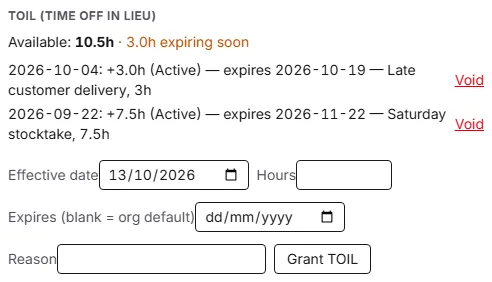
- A manager or admin grants it. On the web, an admin opens the person’s settings and fills in the date the hours count from, the hours (in quarter hours), an optional expiry date and a reason, such as “Saturday stocktake, 7.5h”. In the iPhone and Android apps, managers and admins can grant TOIL from the Approvals tab to the people they approve for.
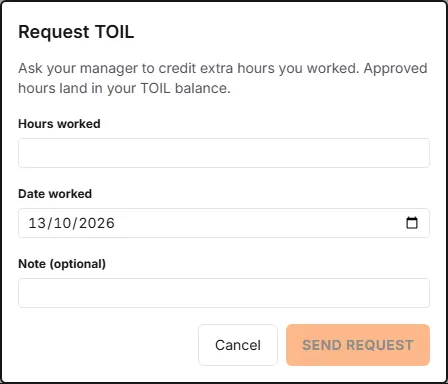
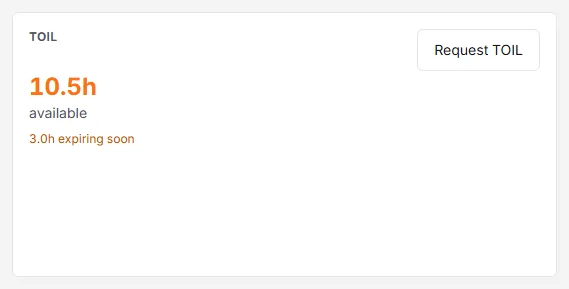
- Staff request it, and a manager approves. On My leave, the TOIL card has a Request TOIL button. Staff enter the hours worked, the date they worked them (today or earlier) and an optional note. The request goes to the managers and admins who approve for them, who get an email. Approved hours go straight into the balance, dated the day they were worked.
Either way, the person gets an email when hours are credited, which they can turn off in their notification settings. A declined request is not credited, and the person is told. How to grant TOIL and how staff claim it.
Rotaleave does not work TOIL out for you. It does not turn clock-ins or timesheets into TOIL, and it applies no rate. It credits exactly the hours entered. If your policy gives back time and a half, work out the figure first; the free TOIL calculator converts extra hours at 1:1, 1.5:1 or 2:1.
Expiry: one default, or a date on each credit
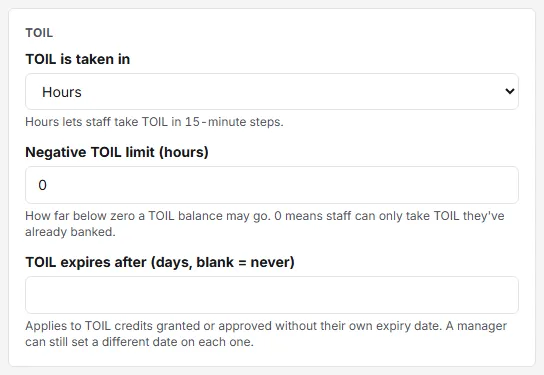
Many TOIL policies say hours must be taken within a set time. In Settings → Leave → TOIL, an admin can set TOIL expires after a number of days. Any credit granted or approved without its own date then lapses that many days after the day it was earned. Leave the setting blank and credits never expire unless a date is set on each one. The setup wizard suggests 30 days when you switch TOIL on.
A manager can still agree something different for one credit. The grant form has its own expiry date, and so does the approval dialog for a staff request; either one wins over the default. Changing the default never changes credits that already exist.
When TOIL is taken, the hours that expire soonest are used first. Staff see an amber “expiring soon” line on their TOIL card for hours that lapse within the next 30 days. How TOIL expiry works.
Booking TOIL as time off, in hours, half days or full days
Staff take TOIL the same way they book holiday: they choose the TOIL leave type on the booking form, on the web or in the app. If the setup wizard did not create one, an admin ticks TOIL (spends the TOIL bank) on a leave type. The TOIL is taken in setting decides what they can pick:
- Hours (the default): a start and end time on one day, in 15-minute steps, as well as half and full days.
- Half days: mornings, afternoons and full days.
- Full days: whole days only.
This is separate from how holiday is booked, so TOIL can be taken by the hour even where holiday is taken in whole days. Before sending, the form shows what the booking will use and what will be left, for example “This request: 1.0h TOIL · 4.0h TOIL remaining after”. Only time inside the person’s working hours comes off. Cancel or change the booking and the balance corrects itself. How to book TOIL.
A negative TOIL limit, and when an admin can override it
By default a TOIL balance cannot go below zero: staff can only take hours they have already banked. If you let people take TOIL before they earn it, set a Negative TOIL limit, up to 40 hours in quarter hours. The booking form then shows the balance in amber when it would dip below zero, and refuses anything past the limit.
Staff and managers are both held to the limit. An admin can book past it by giving a reason, which is kept with the booking. Hours credited later pay off a negative balance first. How the negative TOIL limit works.
Balances, the ledger and the TOIL report
Each person sees their TOIL card on My leave: hours available, anything expiring soon, any negative balance with the limit, and requests still waiting for approval.
Behind the balance is a ledger. It lists every credit with its status (Pending, Active, Declined or Voided), its expiry date and its reason. Added hours by mistake? Void the credit. Rotaleave refuses a void that would leave TOIL someone has already taken without hours to cover it.
Managers and admins also get a TOIL tab under Reports. It lists everyone with TOIL, with hours credited, spent and available, hours expiring in the next 90 days, and the negative limit. Download it as a CSV or print it. See all the reports.
TOIL in the iPhone and Android apps
- The Home screen shows the TOIL balance, anything expiring soon and a note if it is below zero.
- Staff can send a TOIL request and book TOIL, in hours if your organisation allows it.
- A TOIL history screen lists hours credited and taken, and credits that have lapsed.
- Managers approve or decline TOIL requests, and grant TOIL, on the Approvals tab.
More on what the app does.