Common questions
Quick answers to the questions people ask most about Rotaleave — allowances, cancelling bookings, approvals and the locked pay period.
Updated 13 October 2026
Most support questions turn out to be one of these. Each answer links straight to the control that explains it.
Why is the remaining balance lower than I expect?
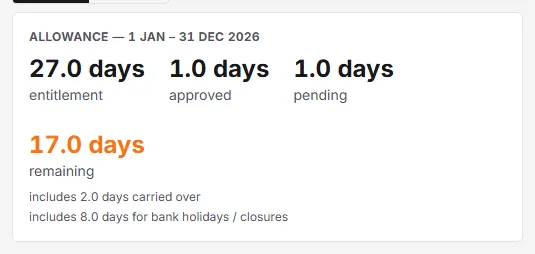
A request that is still Pending already draws your allowance down — it has its own pending figure on the allowance card, and remaining is what is left after both it and your approved leave. Approving it doesn’t reduce your balance any further, because it was already reduced the moment you sent it. Cancelling the request gives the time back — and so does a manager declining it, since a declined booking drops out of the same count as a cancelled one. See “Cancelling an approved booking vs a pending one” on the My leave Cancel button, or the same point from an approver’s view on the Approvals request summary.
Why does someone’s allowance show the wrong number?
Check the person’s Allowance unit. It isn’t a display choice — it decides whether their annual allowance and carry-over cap are read as days or as hours, so the wrong setting shows the wrong number, not just a mis-formatted one. Switching it converts the figures through their working day, so their actual entitlement doesn’t change. If they have no working schedule on file, a 7-hour day is assumed, so check the converted figures.
Days or hours — which does my organisation use?
That’s set separately, at Settings → Leave → Allowance unit. Unlike the per-person control above, switching this one re-interprets the organisation default rather than converting it, so check which of the two pages you’re actually on before relying on either.
Why can’t I cancel my booking?
Cancel only appears on a booking that starts after today and is still Pending or Approved. Once it has started (including a booking that starts today), or it’s already Cancelled or Declined, there’s nothing left to act on — ask a manager if it still needs to change.
Why does it say my booking won’t deduct anything?
This shows up on an Hours-mode request booked against a time your working pattern doesn’t cover — six till seven in the evening, say, when your schedule finishes at five, has nothing scheduled at six to be excused from, so there’s genuinely nothing to deduct. See Request leave for the full explanation; check the working pattern before assuming the booking itself is wrong.
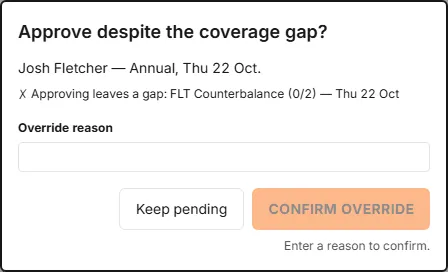
What does “Approving leaves a gap” mean?
It’s a competence shortfall, not a headcount one: someone qualified — a first-aider, a licensed driver — would not be on shift if the request goes through. That’s different from “Department over capacity”, which is a headcount problem instead. Both are explained on the Approvals coverage warning.
Why is the pay period locked?
Once holiday has accrued against the current pay-period grid, changing it would silently rewrite past accrual, so the API refuses the change. See Settings → Leave → Pay period.
When does the leave year start, and can I change it?
It’s set in the setup wizard and can be changed any time under Settings → Leave, in the Leave year card (Leave year starts in and Start day, then Save leave year). Saving re-cuts every balance into the new leave year, so bookings and carry-over already made may land in a different year. See Settings → Leave.
How do I set one person’s allowance?
As an admin, open People, click the row’s ⋯ menu, then Personal settings. See People → Row actions for what else lives behind that menu.